

Those of you who follow our development blogposts closely might’ve noticed that the past few snapshots have been a little on the light side. This isn’t to say that there was a lack of features on display nor that we’re dissatisfied with what we’ve been able to share so far, but it was enough that some users were under the impression that Godot 4.8 was going to mainly be focused on stability and bugfixes compared to past releases. While that wouldn’t be inherently bad, it couldn’t be further from the truth. On the contrary, this development snapshot was easily the hardest to narrow down what features to highlight out of every blog post I’ve written since joining the foundation, because there’s so much to share. Buckle up, we’ve got a lot of ground to cover.
Please consider supporting the project financially, if you are able. Godot is maintained by the efforts of volunteers and a small team of paid contributors. Your donations go towards sponsoring their work and ensuring they can dedicate their undivided attention to the needs of the project.
Jump to the Downloads section, and give it a spin right now, or continue reading to learn more about improvements in this release. You can also try the Web editor, the XR editor, or the Android editor for this release. If you are interested in the latter, please request to join our testing group to get access to pre-release builds.
The cover illustration is from CICADAMATA”, a fast-paced first person platformer, where you shoot and speedrun your way through the CASCADE while unraveling what you have become. You can buy the game on Steam, and follow the developers on YouTube.
Highlights
In case you missed them, see the 4.8 dev 1, 4.8 dev 2, and 4.8 dev 3 release notes for an overview of some key features which were already in those snapshots, and are therefore still available for testing in 4.8 dev 4.
VFX: Trail3D
If you know anything about trails in 3D design, you know that they’re absurdly complicated to get right, requiring an innate understanding of linear algebra and geometry as an absolute minimum. This is why a 3D trail node remained one of our most highly-requested features for years; a means of bridging this knowledge gap for designers, allowing them to achieve the desired effects in an accessible manner. Some developers have taken a stab at their own implementations, such as Zi Ye as part of his Cozy Cube Godot Addons, but many desired a native solution that could be leveraged out-of-the-box.
Enter QbieShay. By building on top of the wonderful foundation provided by Zi, she managed an official integration of Trail3D with GH-117107. Those seeking stunning visual effects through trails will no longer need deep knowledge of how meshes are drawn, UVs are assigned, or anything of the sort; everything Just Works™.
Despite also introducing Line3D, that class is unimplemented at this time. Beyond enum declarations, direct use of Line3D cannot be achieved.
Shaders: VisualShader node groups
While we’re quite happy with the current state of our visual shader, some pain points have always remained. This is especially true for more complex implementations, as the scope of the graphs could become quite unweildy over time. It’s no surprise then, that one of the most common requests for the visual shader was a way to reduce or remove the bloat and redundancy that comes from these complex files.
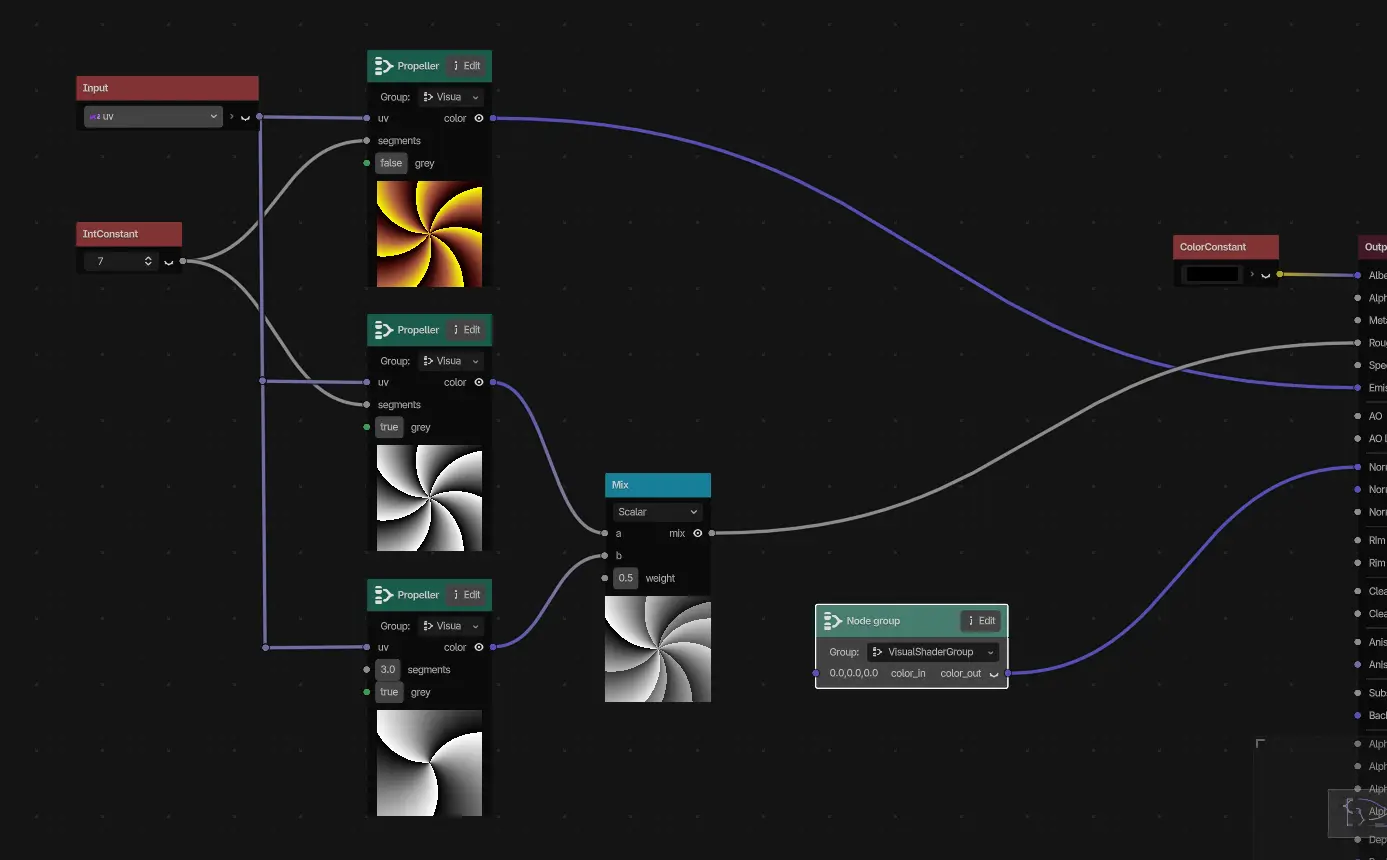
Hendrik Brucker delivered a solution in GH-99404, gracing the visual shader with the versatility and ubiquity of node groups. By leveraging node groups, users can now efficiently encapsulate frequently-used sections of a shader and reuse them across the graph with zero friction. What was once a chaotic mess of boilerplate and difficult-to-parse information is now neatly bundled with dedicated node groups:
Editor: Convert main screen plugins into docks
Ever since the introduction of the EditorDock in Godot 4.6, Tomasz Chabora has been on a journey to migrate our existing editor plugins to this new system. The most ambitious migration yet occurred earlier this week with GH-113051, which converts the main screen itself into a dock. This is a very fundamental change to how the editor is handled, but the benefits that are immediately available are more than worth it.
As a result of these changes:
- The main screen editors aren’t tied to specific plugins anymore, instead being regular
EditorDocks. - Main screen docks have their own editor setting for tab style.
- All main screens can be closed.
- All main screens can float.
- The only exception is Game, as custom behavior is currently tightly integrated with
WindowWrapper.
- The only exception is Game, as custom behavior is currently tightly integrated with
The old main screen plugin workflow is still supported, but deprecated. Compatibility might be broken in some edge cases, so exercise caution.
Editor: Script method outline to Tree
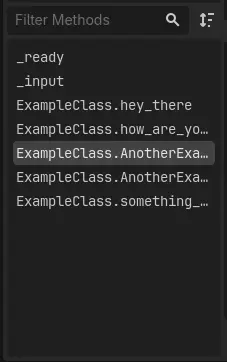
While most IDEs and other editor tools provide a method/section outline for their scripts/documentation in the form of a tree, our editor has presented them in the form of a list for the longest time. Starting with GH-121534, thanks to the work of Michael Alexsander, we were able to make the transition to a tree-like syntax thanks to… well, Tree.
| Before | After |
|---|---|
 | 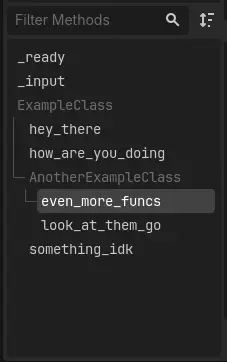 |
Also the current selection is no longer forgotten when saving your project. Whoops!
GUI: Resize font to fit option for Label and RichTextLabel
Every developer knows the struggle of text container constraints all too well. No matter how reasonable you think your font scale is, or what kind of variable text you believe can make it in, a translation string or player input will inevitably break those bounds. Even if you actively and thoroughly filter all input length at all times, that’s still a lot of code upkeep and boilerplating across different areas of your project to achieve the desired effect.
Ismail Ivanov is one of many who felt this struggle, and decided to do something about it. GH-116791 wakes Label and RichTextLabel from this nightmare in the form of three new properties: auto_font_size, min_font_size, and max_font_size.
Rendering: Multi-bounce ambient occlusion approximation
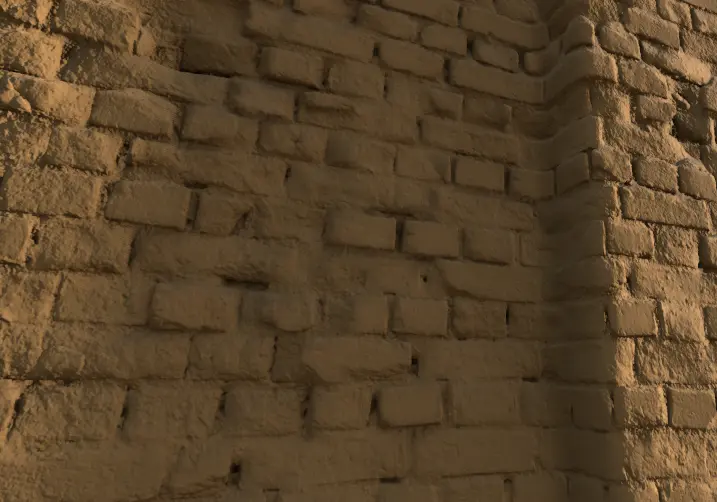
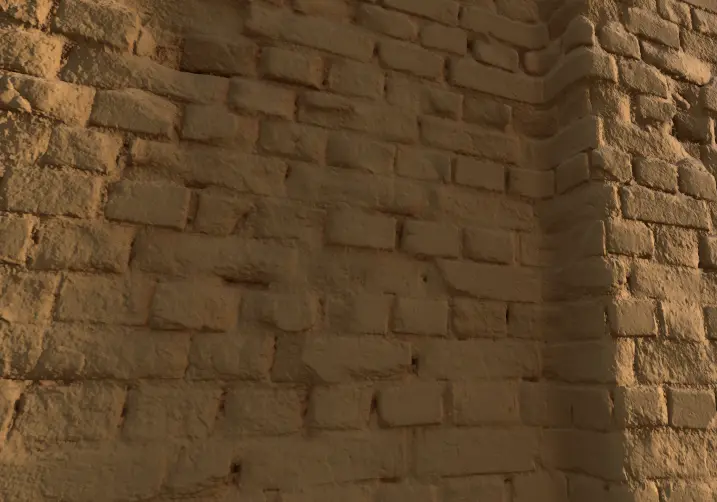
Rendering has already received quite a lot of love in the 4.8 development cycle, which is why it’s all the more impressive that there’s so much to showcase in this snapshot alone! KenzieMac130 starts out strong with an incredibly impressive first-time contribution in GH-115426, which introduces multi-bounce ambient occlusion approximation. Previously, ambient occlusion in Godot failed to account for interreflections, meaning scenes were over-darkened in practice. Moving forward, we’ll be able to leverage a low-cost approximation of these interreflections, providing a more vibrant and accurate representation of what a given surface “should” look like.
As cited in the PR, this implementation is based upon a method from this 2016 Siggraph presentation, the technique of which has been adoped as industry-standard across multiple other engines. Those seeking a more technical breakdown are strongly encouraged to view the presentation itself!
| Disabled | Enabled |
|---|---|
 |  |
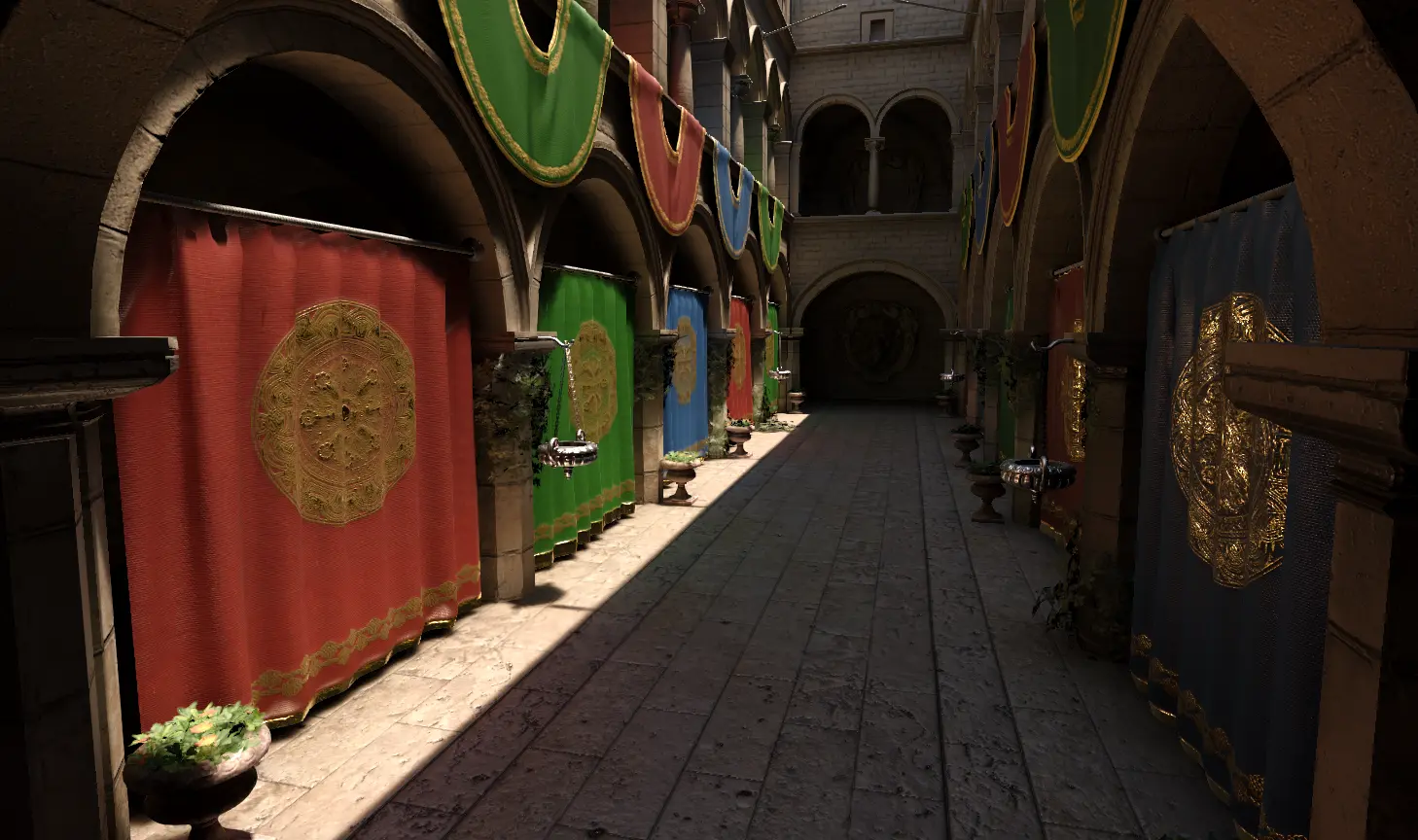
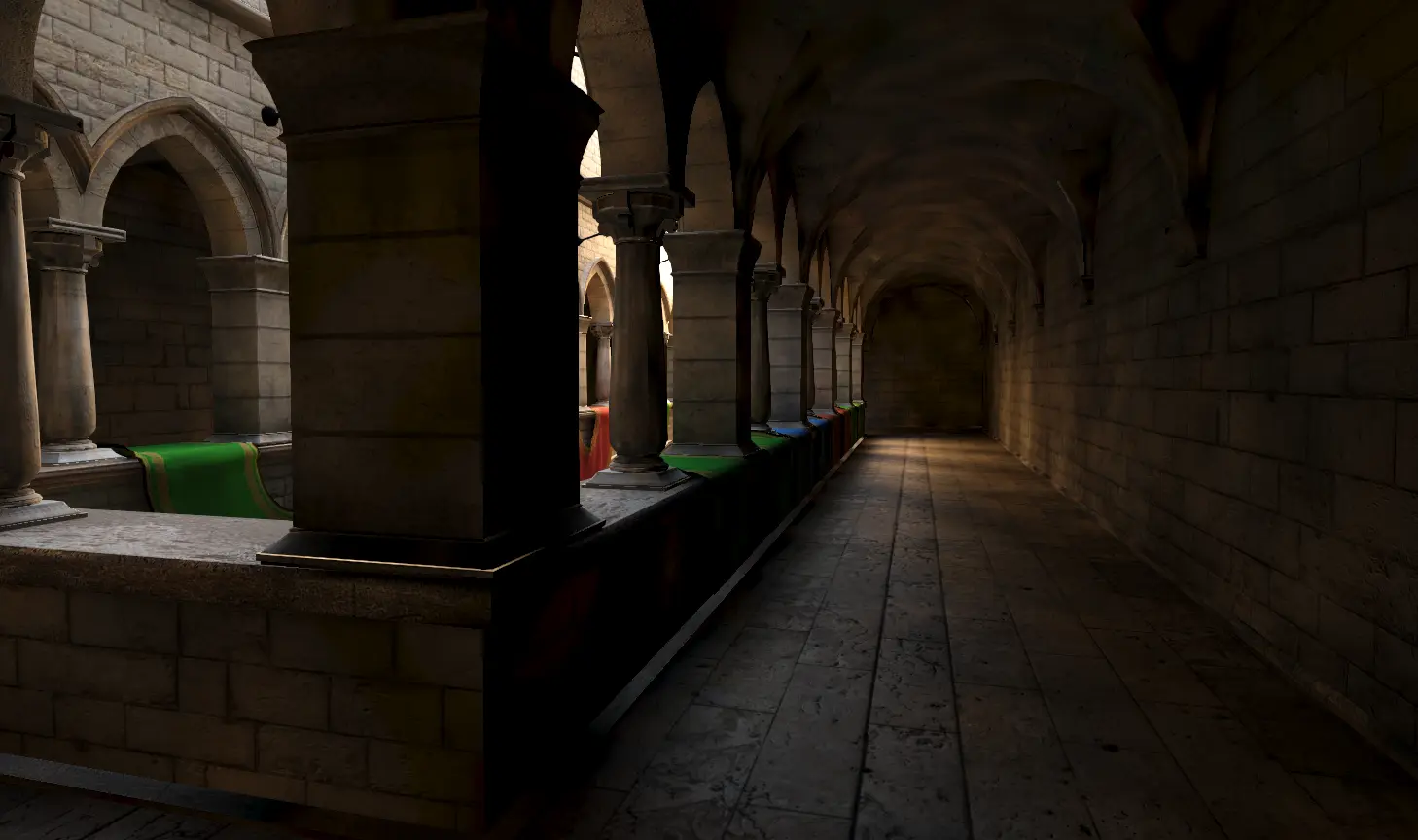
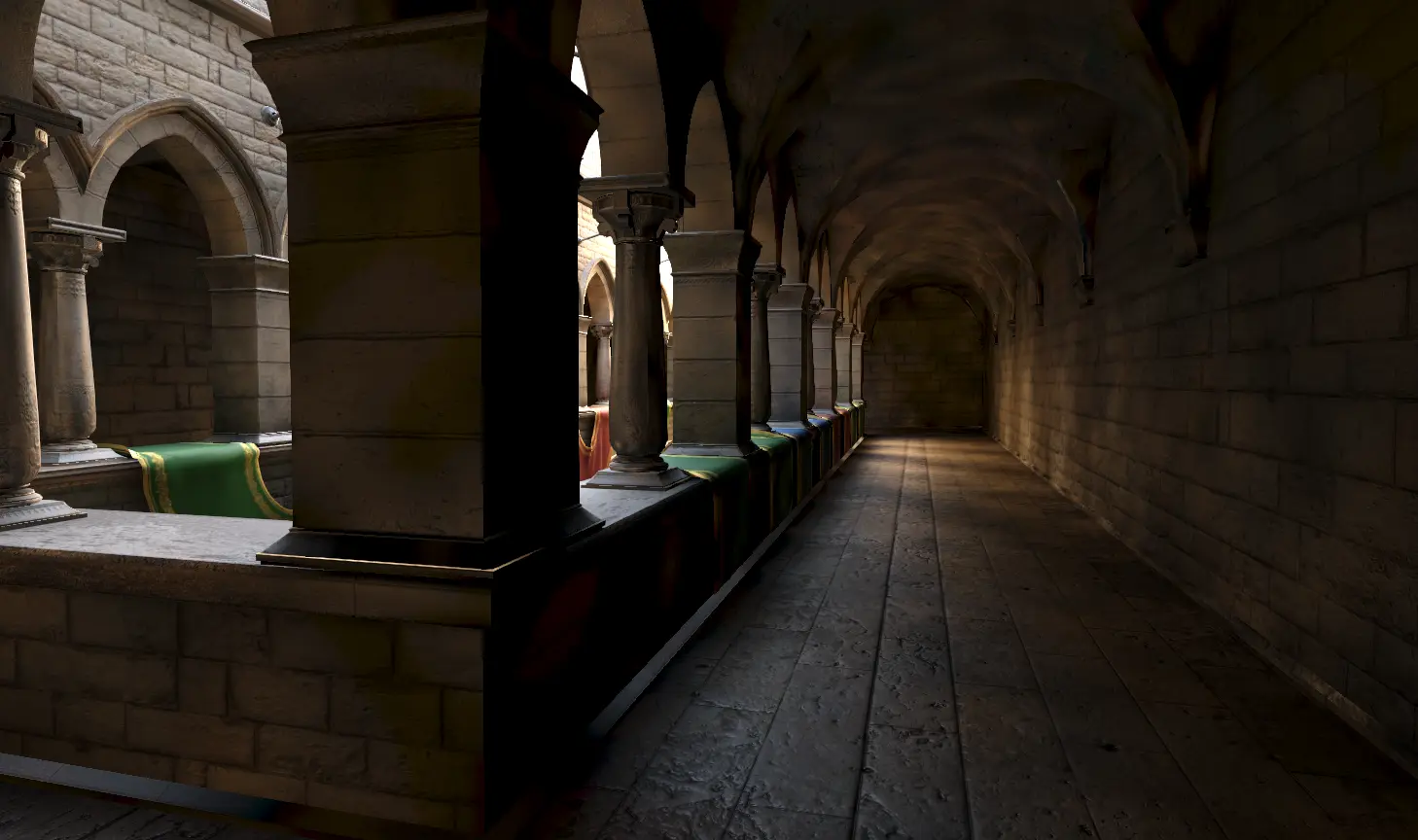
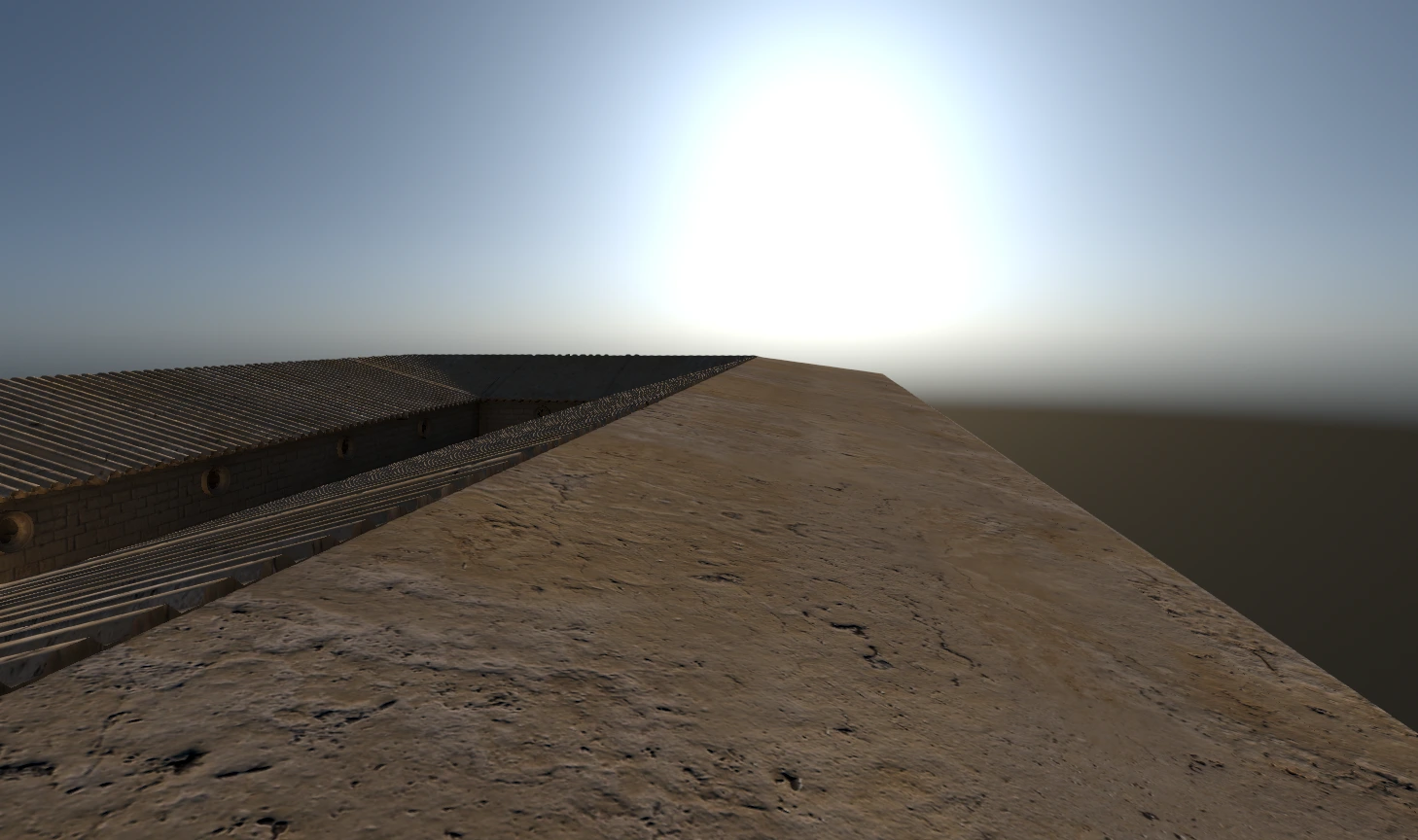
Rendering: Directional lightmap specular light
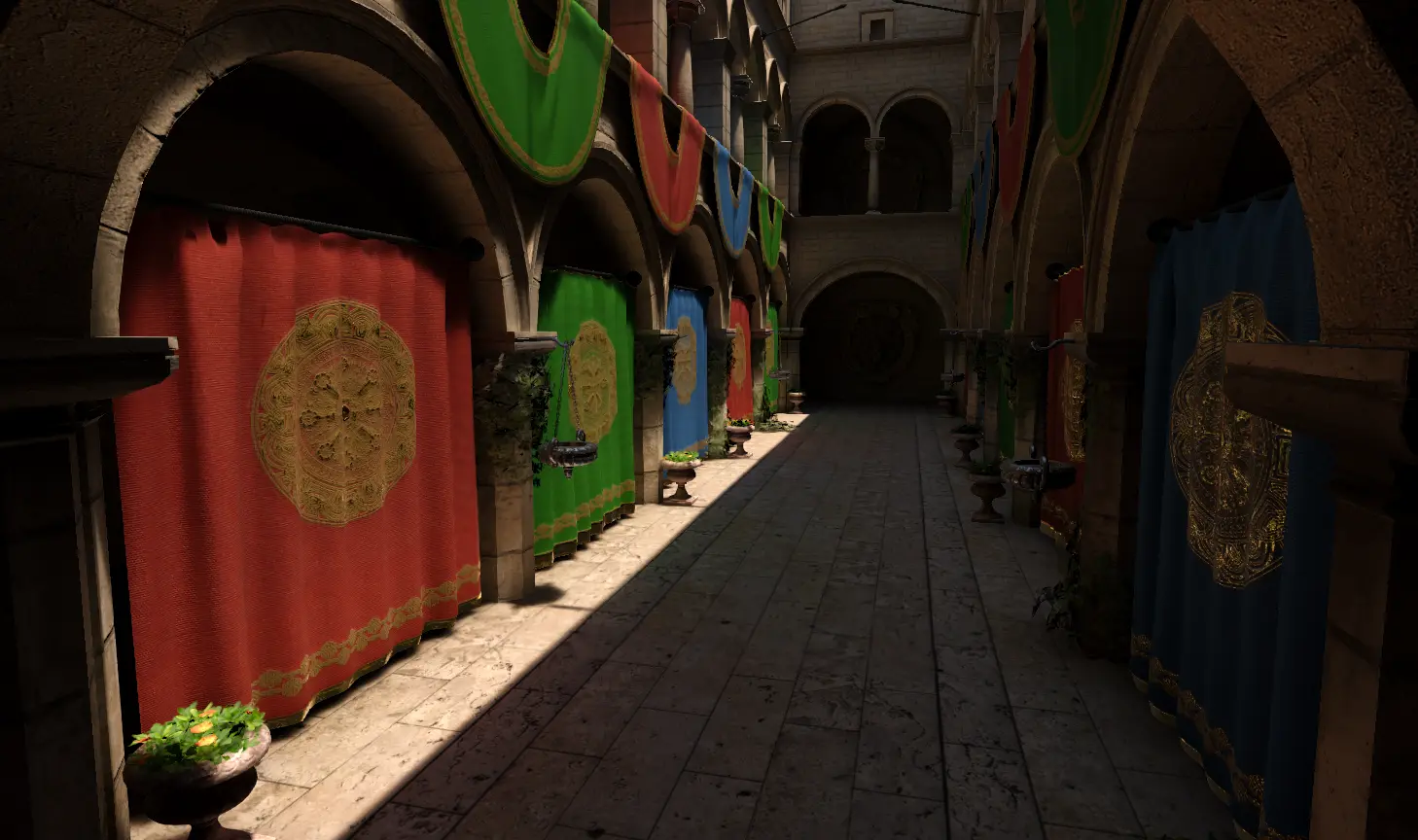
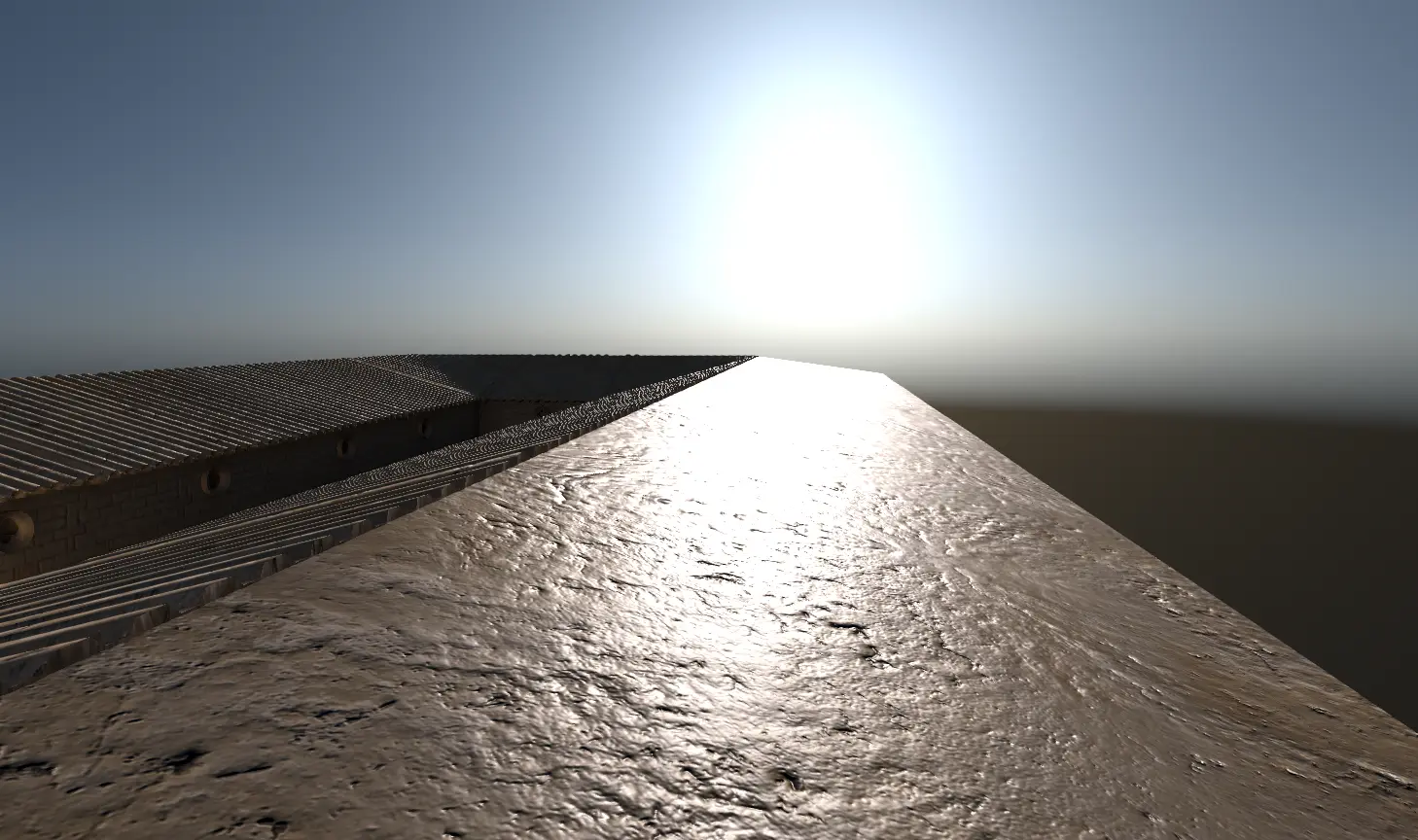
Much like the previous point, Juan Manuel builds upon an existing foundation—this time by longtime member Hugo Locurcio—in order to introduce directional lightmap specular light to the engine with GH-109737. This addresses an existing issue with the way baked directional light set as static interacted with the LightmapGI set to directional, as this combination failed to bake any specular information. Thanks to the aforementioned PR, any directional specular information can not only be baked into the LightmapGI, but will produce results comparable to realtime directional light!
Those who want more a more technical breakdown on the subject are encouraged to watch this 2018 GDC presentation. For practical examples, we welcome you to enjoy this small sample of comparisons pulled from the PR:
| Disabled | Enabled |
|---|---|
 |  |
 |  |
 |  |
Rendering: Decal support for the compatibility renderer
While not a “new” rendering feature per-se, this might as well be for those stuck on the compatibility renderer. While several features are excluded from this renderer by design—the intent is maximal support and performance after all—that doesn’t mean that an effort isn’t being made to bring existing features over. The only caveat is that the features in question must be suited to the aforementioned scope, such that performance won’t be degraded to any significant degree, nor should the feature itself be compromised to a point that it might as well not have been brought over in the first place.
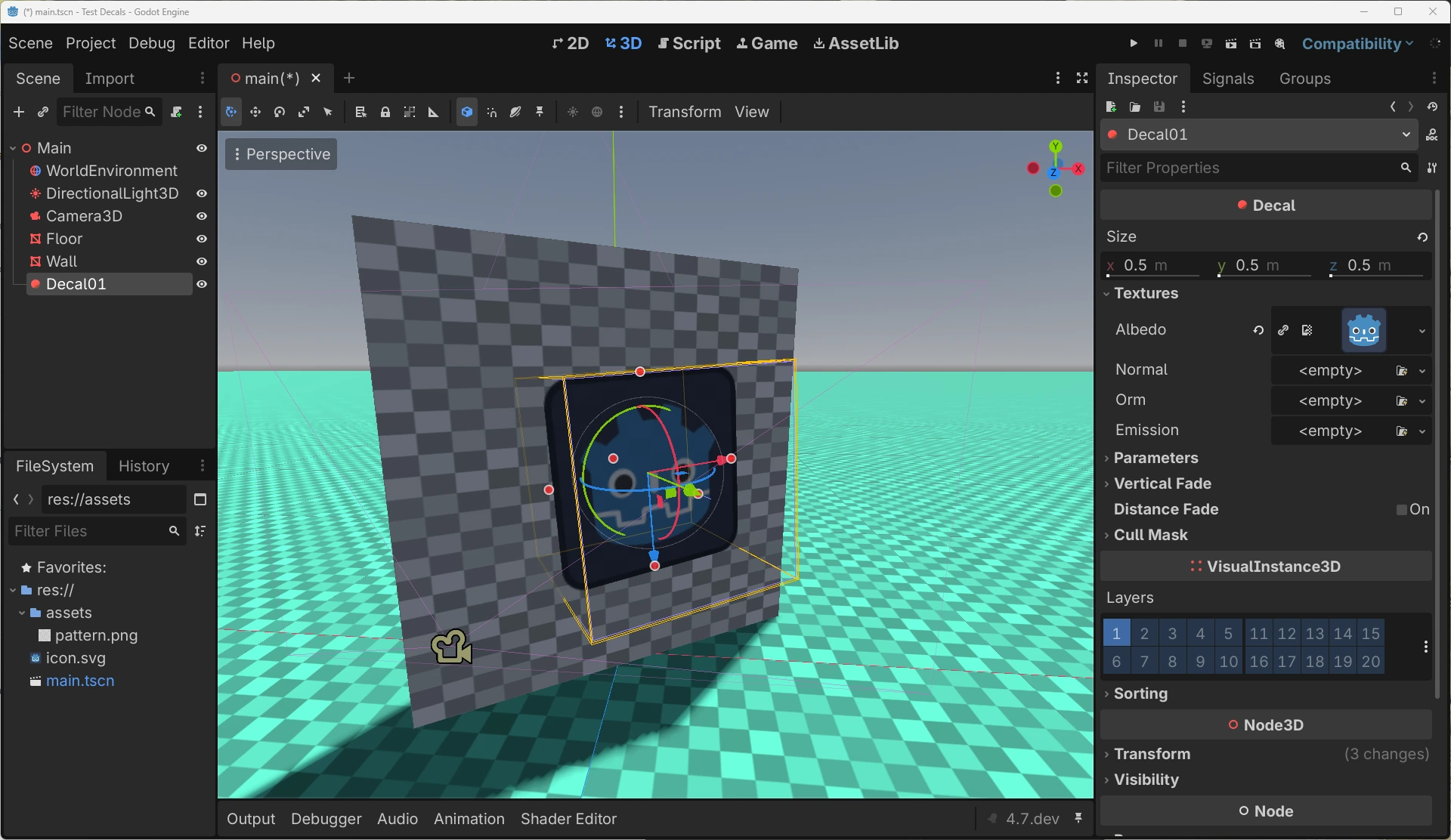
Bastiaan Olij is no stranger to this song-and-dance, so it’s no surprise that he’s behind GH-118070, which brings one such feature to the compatibility renderer: decals! Based upon the approach taken by our mobile renderer and further adjusted for OpenGL, decals are brought over largely unscathed for users of all renderer types to enjoy. The only caveats of note for the compatibility renderer are as follows:
- The maximum number of decals for a given frame is dependant on the hardware’s buffer limits. This is soft-capped to 64 by default in the project settings, but can be further increased depending on the capabilities of your targeted platform.
- A given surface can only have a maximum of 8 decals. This is a hard-coded limit.
Export: Automate Android & Java SDK setup
While Godot supports exporting projects to Android, we sympathize with those developers who’ve struggled with the busywork that comes with it. That is: handling the SDK setup for Android and Java beforehand. Nobody is more familiar with this workflow than Fredia Huya-Kouadio, which is why he took to streamlining the entire process in GH-121849. Starting now, users will be able to leverage the new AndroidSDKManager class, which automates the entirety of this process. Now, at the click of a button, the editor will take care of downloading, setting up, and managing the Android and Java SDKs automatically!
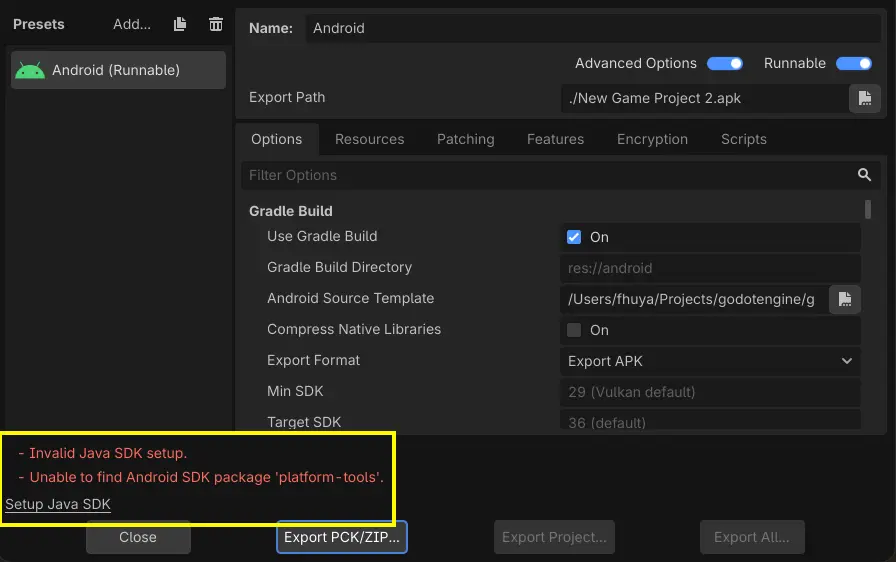
This can be achieved in one of two ways. The first is within the Export Presets windows when an Android preset is added. If the editor detects that the current Android/Java SDK is invalid or missing, you’re now prompted with the ability to set those up then and there.
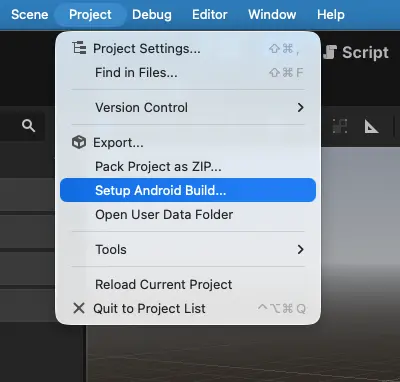
The second method is a reworked Install Android Build Template... from the Project menu, now renamed to Setup Android Build.... The updated button triggers the prompt for installing the Android/Java SDK when it detects they are not properly set up.
And more!
There are too many exciting changes to list them all here, but here’s a curated selection:
- 2D: Improve editing of 2D polygons (GH-98417).
- Animation: Add
BoneSpreader3D&skin_scaleproperty to Bone in Skeleton3D (GH-120609). - Animation: Add AnimationNodeObservers for signaling animation events (GH-118789).
- Audio: Allow CoreAudio to sleep and avoid busy work when idling (GH-117162).
- Buildsystem: Fix building Android Editor with separate arches (GH-122186).
- Buildsystem: Update Emscripten to 6.0.1 (GH-122412).
- Core: Move property maps from
ClassDBtoGDType. AccelerateObjectproperty access 1.6x (GH-122596). - Editor: Add replace preview to Find in Files (GH-122659).
- Editor: Add toggle button for texture preview metadata overlay (GH-117216).
- Editor: Clean and simplify
Inspectorheader (GH-117499). - Editor: List monitor resolutions and refresh rates in editor Copy System Info (GH-122809).
- Export: Editor: Add visionOS templates to download manager (GH-122559).
- GDScript: Disallow strings as comments (GH-121833).
- Input: Add support for gamepad gyro auto-calibration (GH-121487).
- Platforms: Android: Expand Portrait Mode support and fix related issues (GH-121892).
- Platforms: Replace WinRT/C++ dependency with custom COM+ code (GH-121633).
- Platforms: Windows: Implement support for desktop toast notifications (no WinRT/C++) (GH-121711).
- XR: visionOS: Add support for hand tracking and PSVR2 controllers on Apple Vision Pro (GH-122567).
Changelog
86 contributors submitted 224 fixes for this release. See our interactive changelog for the complete list of changes since 4.8 dev 3. You can also review all changes included in 4.8 compared to the previous 4.7 feature release.
This release is built from commit b56a91878.
Downloads
 Linux
Linux macOS
macOS Windows
Standard build includes support for GDScript and GDExtension.
.NET build (marked as mono) includes support for C#, as well as GDScript and GDExtension.
While engine maintainers try their best to ensure that each preview snapshot and release candidate is stable, this is by definition a pre-release piece of software. Be sure to make frequent backups, or use a version control system such as Git, to preserve your projects in case of corruption or data loss.
Known issues
With every release we accept that there are going to be various issues, which have already been reported but haven’t been fixed yet. See the GitHub issue tracker for a complete list of known bugs.
- There are currently no known issues introduced by this release.
Bug reports
As a tester, we encourage you to open bug reports if you experience issues with this release. Please check the existing issues on GitHub first, using the search function with relevant keywords, to ensure that the bug you experience is not already known.
In particular, any change that would cause a regression in your projects is very important to report (e.g. if something that worked fine in previous 4.x releases, but no longer works in this snapshot).
Support
Godot is a non-profit, open-source game engine developed by hundreds of contributors in their free time, as well as a handful of part and full-time developers hired thanks to generous donations from the Godot community. A big thank you to everyone who has contributed their time or their financial support to the project!
If you’d like to support the project financially and help us secure our future hires, you can do so using the Godot Development Fund platform managed by the Godot Foundation. There are also several alternative ways to donate which you may find more suitable.