



At long last, a performance issue with high polling rate mice on Windows has been fixed in Godot, starting with the recently released Godot 4.7.2. This article describes how the fix works, and why it’s so important today.
Note: The definition of “high polling rate” here refers to any mouse that can be configured to having a polling rate of at least 2 kHz. Mice that poll at 1 kHz are not considered high polling rate here, as they generally did not exhibit performance issues except on CPUs with very slow single-core performance.
What are high polling rate mice, and what are they useful for?
To ensure games feel good to play, we want the delay between an action being performed and the result being visible on screen (input lag) to be as low as possible. We also want inputs to be spaced as consistently as possible, avoiding jitter.
Mice are polled at a fixed rate. Historically, this has been 125 Hz as dictated by the USB standard. This means that the mouse input is polled every 8 milliseconds. This poses several limitations:
The mouse position reported to the operating system only updates 125 times per second. If you have a high refresh rate monitor (144 Hz or more), the mouse position will not update every frame, which will make mouse movement look choppy. This affects not just the operating system, but also games that rely on mouse input, including captured mouse mode.
Even on monitors with a 120 Hz or lower refresh rate, the mouse position will not be as consistent across the displayed frames on screen as with higher polling rates. The reason for this is that the mouse updates don’t line up with display refreshes. With a higher polling rate, there will be a lower average deviation between the time the mouse was last updated and the display refresh.
On average, and on top of any latency incurred by the operating system and mouse hardware, there will be a delay of 4 milliseconds between the mouse being moved by the user and the updated position being available to the operating system. While this may sound negligible at first, it is possible for some people to notice differences in mouse latency down to a millisecond.
In the late 2000s, manufacturers started providing options with 250 Hz, 500 Hz and 1 kHz polling rates. For a long time, 1 kHz was the fastest polling rate available on the market.
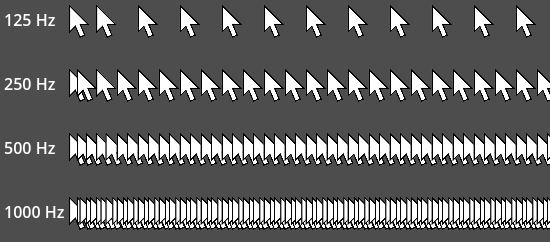
However, since the early 2020s, manufacturers have pushed polling rates beyond 1 kHz, including for wireless models. We’ve seen 2 kHz, 4 kHz and even 8 kHz mice reach the market, with pricing becoming more affordable as time goes on. This high polling rate allows for slightly reduced input latency, but most importantly, it ensures mouse updates are more consistent over time. With modern displays being able to reach refresh rates of 480 Hz, 720 Hz or even more, it becomes increasingly important to push mouse polling rates beyond the 1 kHz barrier.
This led to the rapid adoption of mice with such high polling rates, which poses a problem for software developers.
What’s the issue with high polling rate mice?
As the operating system receives mouse events much more frequently, it must handle them in a timely manner to avoid dropped events, or events being handled too late (which results in additional latency). In other words, with great polling rate comes great responsibility.
Unfortunately, operating systems originally didn’t account for the fact that mice could one day send thousands of updates per second. While modern CPUs’ processing power makes it possible to bruteforce through this problem on some platforms, this was particularly brutal on Windows.
In practice, this manifests as significant framerate drops as soon as a certain threshold of mouse updates per second is exceeded. How fast this threshold is reached depends on the mouse movement speed (as tiny mouse movements will not send an update on every poll), as well as CPU single-core performance. As of 2026 and on recent Windows 11 versions, on most CPUs, this limit is generally somewhere between 1 kHz and 2 kHz. If your mouse sends much more updates than this limit, the framerate can drop to the single digits, leading to an unplayable experience:

This issue is particularly difficult to troubleshoot for less tech-savvy users, as some mice can even default to polling rates above 1 kHz. This leads to a performance loss that appears to be related to the use of a specific mouse model, when it is in fact related to its polling rate.
Godot is not the only engine that runs into this issue on Windows. Thousands of games suffer from this issue too, from the earliest days of Windows gaming to today’s popular releases. Games that use non-captured mouse modes (i.e. with the mouse cursor visible) are more prone to this issue, as extra care must be taken to avoid performance pitfalls in this situation.
Linux (on both Wayland and X11) is generally not affected by this issue, regardless of the game.
Why does this issue happen on Windows specifically?
Windows has a long story of backward compatibility, dating back 30+ years. While this is a blessing in many cases, it ends up being a problem in this situation.
Windows has several types of mouse motion events:
Legacy input (known as
WM_MOUSEMOVE). This is the usual kind of mouse motion event, designed for applications rather than games.Raw input (known as
WM_INPUT). Raw input was introduced in Windows XP as a way to allow games to read mouse input in a way that ignores OS processing (such as mouse acceleration, also known as the “Enhanced pointer precision” option). This is particularly desirable for first-person games, where mouse acceleration is usually not wanted by players (or is better configured in-game when desired).
However, when requesting raw input in a Windows application, it will still receive legacy input events at the same time. This is the case even when the application is currently in captured mouse mode (such as a first-person game, where the mouse cursor is not visible).
While it is possible to request only raw input and no legacy input, doing so breaks several parts of the application that are expected by users, such as moving the window by dragging its title bar. Therefore, we had to implement a different solution inspired by PH3’s blog post about high polling rate mice on Windows.
Solution
The solution is to treat mouse motion inputs separately from other input types, and handle them in a way that prevents congesting the input system. To achieve this:
Buffered reads are performed in the
DisplayServerWindows::process_raw_input()function.Additionally, in
DisplayServerWindows::process_events(), the Windows APIPeekMessageW()function is called in a way that prevents raw input (WM_INPUT) from being dispatched right away (which is what normally causes performance drops in captured mouse mode). Instead, it stays in queue for the next buffered read inprocess_raw_input().Legacy inputs (
WM_MOUSEMOVEandWM_NCMOUSEMOVE) are handled separately, but are only dispatched once per frame at most each. This avoids performance issues at high polling rate when in non-captured mouse modes.
Other inputs (keys, mouse buttons, mouse wheel) are treated as before, as they are not sent frequently enough to be a problem under the old approach. While keyboards with a polling rate greater than 1 kHz exist, it’s humanly impossible to (de)press keys in a way that could saturate the current input system.
Gamepad input remains treated by a separate system on Windows, and is not impacted by this fix. In any case, there are very few gamepads that can poll above 1 kHz as of writing.
Note that projects should still be careful to optimize their _input() and _unhandled_input() functions, particularly the code paths that are called for InputEventMouseMotion. These methods may be called once per rendered frame when input accumulation is enabled (the default). For example, on a 480 Hz monitor with V-Sync enabled, these methods may be called 480 times per second during fast mouse movements, assuming the system is fast enough to render at least 480 FPS. When input accumulation is disabled, these methods may be called on every mouse update, which can potentially mean 8,000 calls per second when using a mouse with 8 kHz polling rate.
Benchmark
For testing, we use the InputRepro2 testing project which is available in the pull request description.
PC specifications:
- CPU: AMD Ryzen 9 9950X3D
- GPU: NVIDIA GeForce RTX 5090
- RAM: 64 GB (2×32 GB DDR5-6000 CL30)
- OS: Windows 11 24H2
- Monitor: ASUS ROG PG32UCDP (1080p @ 480 Hz mode)
Note: 4.7.1.stable does not include the fix described in this article, while 4.8.dev3 is the first development snapshot to include it. The recently released 4.7.2.stable also includes the fix.
Average framerate when moving the mouse in circles quickly:
No V-Sync (unlimited maximum framerate)
| Benchmark | 4.7.1.stable | 4.8.dev3 |
|---|---|---|
| No movement | 4097 FPS (0.24 mspf) | 4061 FPS (0.25 mspf) |
| With movement, visible mouse @ 1 kHz | 2641 FPS (0.38 mspf) | 2560 FPS (0.39 mspf) |
| With movement, visible mouse @ 2 kHz | 1751 FPS (0.57 mspf) | 1848 FPS (0.54 mspf) |
| With movement, visible mouse @ 4 kHz | 973 FPS (1.03 mspf)* | 1546 FPS (0.65 mspf) |
| With movement, visible mouse @ 8 kHz | 173 FPS (5.78 mspf)* | 1103 FPS (0.91 mspf) |
| With movement, captured mouse @ 1 kHz | 2583 FPS (0.39 mspf) | 2669 FPS (0.37 mspf) |
| With movement, captured mouse @ 2 kHz | 1979 FPS (0.51 mspf) | 2110 FPS (0.47 mspf) |
| With movement, captured mouse @ 4 kHz | 1778 FPS (0.56 mspf)* | 1962 FPS (0.51 mspf) |
| With movement, captured mouse @ 8 kHz | < 1 FPS (>1000.00 mspf)** | 1703 FPS (0.59 mspf) |
Prior to the fix, performance dropped to unplayable levels when moving the mouse with 8 kHz polling rate. Even with a 4 kHz polling rate, there were significant frametime deviations that resulted in movement being visibly jagged:
Compare the above graph with this frametime graph recorded under the same conditions, but with the fix in effect:

The 1% low FPS figure has been increased by a factor of 45.8 here! This is just one example of how significant the improvement can be thanks to this fix.
On slower CPUs, you will get more benefit from the fix described in this article, as the CPU used for this test has very high single-core performance (which is what determines how many input messages can be read per second). While this fix was not a huge change at 2 kHz polling rate on this particular CPU, it will definitely come in handy on slower processors or laptop CPUs, which have lower single-core performance compared to desktop CPUs.
How does this translate to a scenario where we aim to reach a high framerate consistently? With this fix, it’s a lot more feasible at 8 kHz now:
V-Sync 480 Hz
| Benchmark | 4.7.1.stable | 4.8.dev3 |
|---|---|---|
| No movement | 480 FPS (2.08 mspf) | 480 FPS (2.08 mspf) |
| With movement, visible mouse @ 1 kHz | 478 FPS (2.09 mspf) | 478 FPS (2.09 mspf) |
| With movement, visible mouse @ 2 kHz | 473 FPS (2.11 mspf) | 477 FPS (2.10 mspf) |
| With movement, visible mouse @ 4 kHz | 472 FPS (2.12 mspf)* | 477 FPS (2.10 mspf)** |
| With movement, visible mouse @ 8 kHz | 151 FPS (6.62 mspf)* | 477 FPS (2.10 mspf) |
| With movement, captured mouse @ 1 kHz | 477 FPS (2.10 mspf) | 478 FPS (2.09 mspf) |
| With movement, captured mouse @ 2 kHz | 477 FPS (2.10 mspf) | 478 FPS (2.09 mspf) |
| With movement, captured mouse @ 4 kHz | 469 FPS (2.13 mspf)* | 478 FPS (2.09 mspf) |
| With movement, captured mouse @ 8 kHz | < 1 FPS (>1000.00 mspf)** | 477 FPS (2.10 mspf) |
Prior to the fix, we saw a similar issue to the test case where V-Sync is disabled. The framerate didn’t quite reach the 480 FPS target we set here. In fact, it was lower when V-Sync is enabled at 8 kHz with the visible mouse mode (151 FPS instead of 173 FPS). On the frametime graph, there were frametime spikes that were easily noticeable to the naked eye:

The framerate is much more stable now, and is almost a locked 480 FPS:

Slight deviations at framerates this high are expected, as each frame only has ~2.1 milliseconds to render. It may be possible to find further improvements, but we are getting into the realm of diminishing returns here.
- *: Large deviations in frametime occur, with some frames going past ~16.7 ms (slower than 1 frame at 60 FPS). Still playable, but not smooth (which is what we’d want from those high polling rates).
- **: Huge deviations in frametime occur (some frames taking over 500 ms), making it unplayable.
References
- Pull request
- PH3 blog post about high polling rate mice on Windows
- Blur Busters mouse guide
- Fixing jitter, stutter and input lag in the Godot documentation
Support
Godot is a non-profit, open-source game engine developed by hundreds of contributors in their free time, as well as a handful of part or full-time developers hired thanks to generous donations from the Godot community. A big thank you to everyone who has contributed their time or their financial support to the project!
If you’d like to support the project financially and help us secure our future hires, you can do so using the Godot Development Fund platform managed by Godot Foundation. There are also several alternative ways to donate which you may find more suitable.