
It’s been just over two weeks since we saw the stable release of Godot 4.7. In that time, we’ve been hard at working preparing for an upcoming maintenance release with our first 4.7.1 release candidate, and laying a strong foundation for what will become Godot 4.8. Last week already highlighted the former, so we’re opening the week strong with the latter: our first Godot 4.8 development snapshot. Unlike last week, which was entirely focused on regressions and critical bugfixes, we’ll be spotlighting several new features and functionality you can get your hands on right now.
As usual, safety precautions should be taken with any pre-release environment. While we prepare these snapshots with the intent to be suitable for general testing, there will always be a non-zero risk of data loss/corruption. Creating backups before hand and/or utilizing version control are strongly recommended!
Please consider supporting the project financially, if you are able. Godot is maintained by the efforts of volunteers and a small team of paid contributors. Your donations go towards sponsoring their work and ensuring they can dedicate their undivided attention to the needs of the project.
Jump to the Downloads section, and give it a spin right now, or continue reading to learn more about improvements in this release. You can also try the Web editor, the XR editor, or the Android editor for this release. If you are interested in the latter, please request to join our testing group to get access to pre-release builds.
The cover illustration is from Feed The Pit, a story-driven, investigative horror game where you hunt down the wealthy in order to Feed The Pit. You can buy the game on Steam or the iOS App Store, and follow the developers on YouTube and itch.io.
Highlights
Editor: Docked game view by default, simplify toolbar
One of the most exciting additions of the past few release cycles was undoubtably the ability to embed the game view within the editor. However, this feature might come as a surprise to many of you, as the default behavior since its inception has been a floating window. This was initially because not all desktop platforms had full support for this functionality, but we’ve since reached the point that all of our supported platforms can utilize it. As such, Michael Alexsander officially kickstarted this new default view in GH-120736 for all projects moving forward.
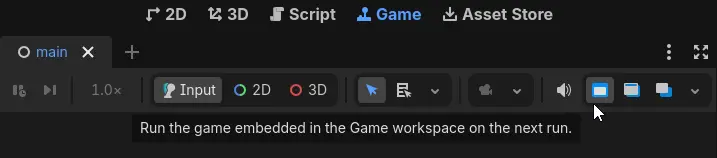
Pairing nicely with this new default setting is a new layout for the game view itself. Specifically: a toolbar overhaul. Because even if you were aware of the docked view before, actually finding the embed options was a bit tricky, as quite a lot of the important information was obfuscated or otherwise obstructed. Jayden Sipe spearheaded a brand new look for the toolbar in GH-118664, emphasizing usability and clarity compared to the prior implementation.
| Old | New |
|---|---|
Docked game view is only enabled by default for new projects; existing projects will have to manually enable this by toggling this option on the updated game view:
Editor: Support drag-toggle visibility in scene tree
There’s a lot of editor goodies to cover today, and Mikael Hermansson keeps the ball rolling with GH-118634, adding the ability to drag-toggle visibility in the scene tree editor. Now when toggling the visibility of a given node, the newly toggled state can be applied to any subsequent nodes when dragging the mouse across them.
Editor: Allow 3D viewports to override Gridmap axis
Michael delivered some QOL to 3D viewports with GH-117569, enabling them to dynamically override the GridMap editor axis. Through the new editor option “Allow Viewport Override” (enabled by default), hovering the mouse over a viewport set to a specific side will cause the currently edited axis to match that side.
Editor: Pseudolocalization preview
We’ve talked about the importance of accessibility a lot in these blog posts, so it should be emphasized that internationalization goes hand-in-hand with those efforts. To that end: making a title more accessible to users across multiple languages can be streamlined significantly through the use of pseudolocalization. This simple toggle simulates changes that might take place during localization, allowing any issues that would come from that process to be recognized as early as possible in development.
It then should come as no surprise that Tomasz Chabora, the same user responsible for hot-swapping languages in the editor, would seek to further expand the utility and awareness of this crucial functionality. Thanks to GH-119443, users are now able to access this functionality from within the editor itself. The hope is that this will not only make developers able to find these issues even earlier than before, but that it will also shine a spotlight on the feature as a whole.
GUI: Sticky tree items
One of the most common requests we’ve seen for improving Tree functionality is the ability to support “sticky items”. That is: the ability for a given line to stick to the top if it represents a foldable region. Koliur Rahman is no stranger to integrating popular editor requests, so it was only a matter of time before they delivered the desired functionality in GH-115697.
Certain trees that have above-average nesting might have a net-negative experience with sticky headers. This will be given hard-coded exceptions in the meantime (see GH-121000 for Skeleton3D), as we investigate configurable minimums.
GUI: TextEdit and CodeEdit touch support
We’ve given the standard desktop experience a lot of love this blogpost, so let’s pivot to something a bit more niche (for desktops): touch support. Given mobile devices represent some of our most prominent platforms, we seek to make the tactile experience of Godot first-rate wherever possible. To that end: Anish Kumar expanded the red-carpet treatment even further with GH-119706, bringing touch support to both TextEdit and CodeEdit. The new functionality is as follows:
- Tap (press → release): Positions the cursor and opens the virtual keyboard.
- Drag (press → drag → release): scrolls the text content, including inertial scrolling support.
- This extends to the code completion popup, which previously could not be scrolled via touch input.
- Text selection:
- Double-tap selects a word.
- Double-tap, hold, and drag selects the portion you’re hovering over.
Core: FuzzySearch and FuzzySearchMatch
“Fuzzy searching” is the practice of a search result returning matches similar to the passed query, rather than only returning an exact match. This functionality has actually been part of the core engine for nearly two years at this point, courtesy of first-time contributor Adam Johnston in GH-98278, in service of our quick open search. However, that’s where the functionality remained ever since, never actually being exposed to our binding API. But now, courtesy of now regular contributor Adam in GH-107126, this functionality is finally ready to roll for all users.
var items := ["Potion of Healing", "Greater Health Potion", "Poison Vial"]
var fuzzy := FuzzySearch.new()

for result in fuzzy.search_all("health potion", items):
	# Prints "Greater Health Potion", "Potion of Healing".
	print(result.target)
And more!
There are too many exciting changes to list them all here, but here’s a curated selection:
- 3D: Add octant visualization to
GridMap(GH-118583). - Audio: Fix
AudioStreamPlayer.get_playback_position()withAudioStreamPlaylistreturns 0 regardless of start time (GH-114867). - Editor: Add an option to run the project upgrade tool when updating to a new Godot version (GH-119466).
- Editor: Android: Update game menu bar to match desktop editor (GH-119156).
- Editor: Show enum integer values in inspector tooltips (GH-102734).
- Editor: Use VHS Circle as the default editor color picker shape (GH-110615).
- Export: Add Filter to Project Export → Options tab (GH-118898).
- Export: Add SPM support for Apple Embedded plugins (.gdip) (GH-116939).
- Input: Add support for joypad touchpads (GH-111714).
- Network: mbedTLS: Update to 4.1.0, PSA Crypto (GH-120725).
- Platforms: Implement
OS::get_processor_name()for Android (GH-120896). - Rendering: Add support for ASTC 6x6 and high quality compression profiles (GH-115003).
- Shaders: GDShader: Add implicit conversion of
boolconstants tofloat,int, anduint(GH-120715).
Changelog
135 contributors submitted 314 fixes for this release. See our interactive changelog for the complete list of changes since the 4.7 feature release.
This release is built from commit ebbf577a0.
Downloads
 Linux
Linux macOS
macOS Windows
Standard build includes support for GDScript and GDExtension.
.NET build (marked as mono) includes support for C#, as well as GDScript and GDExtension.
While engine maintainers try their best to ensure that each preview snapshot and release candidate is stable, this is by definition a pre-release piece of software. Be sure to make frequent backups, or use a version control system such as Git, to preserve your projects in case of corruption or data loss.
Known issues
With every release we accept that there are going to be various issues, which have already been reported but haven’t been fixed yet. See the GitHub issue tracker for a complete list of known bugs.
- There are currently no known issues introduced by this release.
Bug reports
As a tester, we encourage you to open bug reports if you experience issues with this release. Please check the existing issues on GitHub first, using the search function with relevant keywords, to ensure that the bug you experience is not already known.
In particular, any change that would cause a regression in your projects is very important to report (e.g. if something that worked fine in previous 4.x releases, but no longer works in this snapshot).
Support
Godot is a non-profit, open-source game engine developed by hundreds of contributors in their free time, as well as a handful of part and full-time developers hired thanks to generous donations from the Godot community. A big thank you to everyone who has contributed their time or their financial support to the project!
If you’d like to support the project financially and help us secure our future hires, you can do so using the Godot Development Fund platform managed by the Godot Foundation. There are also several alternative ways to donate which you may find more suitable.