

It’s that time of the release cycle once again: the beta snapshot! With this, 4.8 is fully in feature-freeze, and developer resources have shifted exclusively to creating and reviewing various regression fixes.
For those interested in aiding us on our quest to squash any bugs that come up during this time, we once again encourage you to join our bug-hunting sprints. Anyone interested should read the Bug Triage Introduction for more information, and join the #bugsquad and #bugsquad-sprints channels on our developer RocketChat to participate.
Please consider supporting the project financially, if you are able. Godot is maintained by the efforts of volunteers and a small team of paid contributors. Your donations go towards sponsoring their work and ensuring they can dedicate their undivided attention to the needs of the project.
Jump to the Downloads section, and give it a spin right now, or continue reading to learn more about improvements in this release. You can also try the Web editor, the XR editor, or the Android editor for this release. If you are interested in the latter, please request to join our testing group to get access to pre-release builds.
The cover illustration is from Rita, a puzzle game with platforming elements, featuring a wide variety of word puzzles within a cozy world. You can buy the game on Steam, and follow the developer on Bluesky, YouTube, and itch.io.
Highlights
For those who have been following our development snapshots closely, you may be familiar with a number of the highlights in this post which were already covered in previous articles (4.8 dev 1, 4.8 dev 2, 4.8 dev 3, 4.8 dev 4, 4.8 dev 5, 4.8 dev 6, and 4.8 dev 7).
Because we’re already in feature freeze, there are no new features to cover compared to dev 7. Instead, we’ll focus on a general round-up of what to expect from Godot 4.8 as a whole, as well as expanding on some additions that we didn’t have the chance to highlight in our previous snapshots.
- Breaking changes
- 3D
- Animation
- Core
- Documentation
- Editor
- GDScript
- GUI
- Input
- Physics
- Platforms
- Rendering
- Shaders
- XR
Breaking changes
We try to minimize breaking changes, but sometimes they are necessary in order to fix high-priority issues. Where we do break compatibility, we do our best to make sure that the changes are minimal and require few changes in user projects.
You can find a list of such issues by filtering the merged PRs in the 4.8 milestone with the breaks compat label.
- 3D: Remove undocumented script only enter_world callbacks (GH-111504).
- Animation: Fix
LookAtModifier3D.is_interpolating()value is inverted (GH-121391). - Animation: Make Bone Follower classes’ FTI off as default, add warning (GH-119509).
- Core: Fail when trying to use local debugger in release exports (GH-122213).
- Editor: Fix corner cases related to scroll hints across the editor (GH-117080).
- Editor: Remove
ScriptServerfallbacks fromClassDB(GH-123379). - Export: Do not serialize export options that do not have the
PROPERTY_USAGE_STORAGEflag (GH-120721). - GDScript: Forbid scripts from inheriting their own inner classes (GH-121171).
- GUI: Fix duplicated button press event on touch input (GH-120864).
- GUI: Rework dialog default titles (GH-105550).
- Input: Ignore joypads on unfocused window by default for new projects (GH-120399).
- Network: mbedTLS: Update to 4.1.0, PSA Crypto (GH-120725).
- Platforms: Android: Make
OS.alert()blocking (GH-120800). - Rendering: Add support for ASTC 6x6 and high quality compression profiles (GH-115003).
- Rendering: Fix sky shader
SCREEN_UVbuiltin in Compatibility renderer (GH-121676). - XR: OpenXR use proper spatial entity NULL constant (GH-121815).
3D
QbieShay starts our feature round-up strong with Trail3D. Introduced in GH-117107 and built off the foundation by Zi Ye’s Cozy Cube Godot Addons, this native solution enables those seeking stunning visual effects through trails to no longer require deep knowledge of how meshes are drawn, UVs are assigned, or anything of the sort; everything Just Works™.
While being more of an editor feature, the 3D Viewport override functionality by Mikael Hermansson in GH-117569 warrants a highlight in this section. Through the new editor option “Allow Viewport Override” (enabled by default), hovering the mouse over a viewport set to a specific side will cause the currently edited axis to match that side.
And more:
- Add octant visualization to
GridMap(GH-118583). - 3D: Re-enable freelook inertia by default in the 3D editor (GH-121478).
Core
Adam Johnston brought us “Fuzzy searching” with GH-98278, enabling search results to return matches similar to the passed query, rather than only returning an exact match. Now with GH-107126, this functionality is finally ready to roll for all users.
var items := ["Potion of Healing", "Greater Health Potion", "Poison Vial"]
var fuzzy := FuzzySearch.new()

for result in fuzzy.search_all("health potion", items):
	# Prints "Greater Health Potion", "Potion of Healing".
	print(result.target)
var items := ["Potion of Healing", "Greater Health Potion", "Poison Vial"]
var fuzzy := FuzzySearch.new()

for result in fuzzy.search_all("health potion", items):
	# Prints "Greater Health Potion", "Potion of Healing".
	print(result.target)
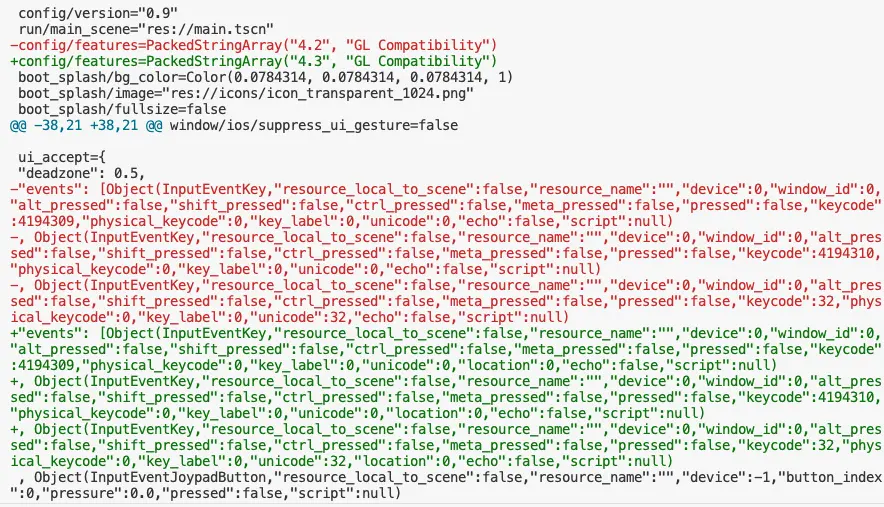
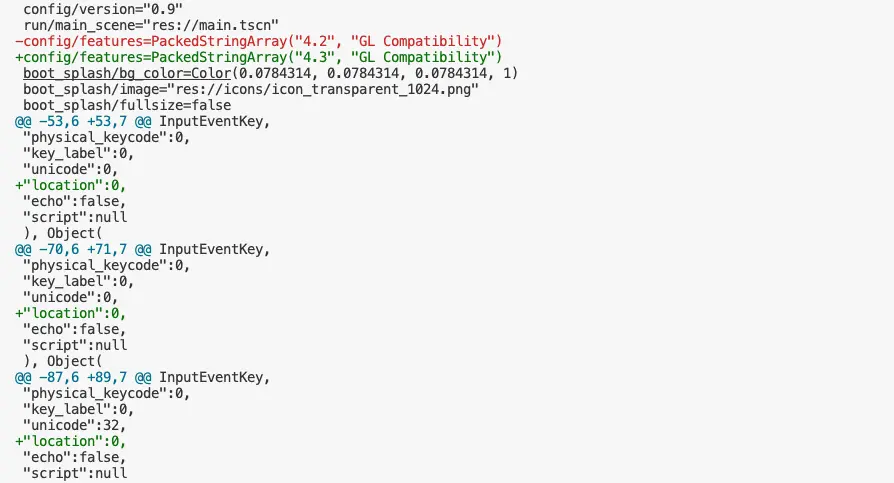
Those using version control will be thrilled to hear that serialization of objects has become much cleaner starting with GH-92102. Robert Wallis ensures that all objects are now formatted such that they won’t cause oversized diffs.
| Before | After |
|---|---|
 |  |
And more:
- Core: Add support for metadata in text scenes (GH-121920).
- Core: Introduce
Variant.to<Type>()as a replacement to implicit conversions fromVariant(GH-123600). - Core: Make it impossible to have more than one main thread, and don’t release unnecessarily (GH-121161).
- Core: Move property maps from
ClassDBtoGDType. AccelerateObjectproperty access 1.6x (GH-122596). - Core: Simplify
GDTypeby storing all properties in a single unified map. Save ~12mb runtime RAM (GH-122751). - Core: Speed up removing many child nodes (GH-120942).
Documentation
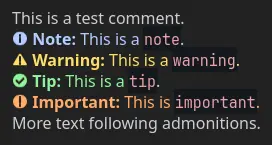
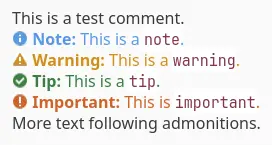
Cyril Bissey’s efforts in GH-111375 grants our documentation—both in-editor and online—native support for admonitions; That being: the built-in systems many documentation tools provide to highlight crucial information. As time of writing, our documentation tools use simple prefixes like “Note:” or “Warning:” to convey a similar effect, but this method causes critical details to blend in with the rest of the text. So starting now, we’ll begin slowly rolling out admonition replacements for these legacy systems, which will end up looking something like what you see below:
| Dark Mode | Light Mode |
|---|---|
 |  |
Editor
Ever since the introduction of the EditorDock in Godot 4.6, Tomasz Chabora has been on a journey to migrate our existing editor plugins to this new system. The most ambitious migration yet occurred with GH-113051, which converts the main screen itself into a dock. This is a very fundamental change to how the editor is handled, but the benefits that are immediately available are more than worth it.
As a result of these changes:
- The main screen editors aren’t tied to specific plugins anymore, instead being regular
EditorDocks. - Main screen docks have their own editor setting for tab style.
- All main screens can be closed.
- All main screens can float.
- The only exception is Game, as custom behavior is currently tightly integrated with
WindowWrapper.
- The only exception is Game, as custom behavior is currently tightly integrated with
Complimenting the new structure of our editor are new and improved toolbars for our various main screens. Jayden Sipe delivered three fantastic overhauls to the Game, 2D, and 3D panels with GH-118664, GH-121080, and GH-121065 respectively. All three being spearheaded by the same creative vision ensures a uniform style; one which heavily emphasizes usability and clarity in comparison to the prior implementations.
| Before | After | |
|---|---|---|
| Game | ||
| 2D | ||
| 3D |
Mikael Hermansson delivers the ability to drag-toggle visibility in the scene tree editor with GH-118634. Now when toggling the visibility of a given node, the newly toggled state can be applied to any subsequent nodes when dragging the mouse across them.
It’s never been easier to make a title more accessible to users across multiple languages, thanks to the use of pseudolocalization. Tomasz Chabora, seeking to further expand the utility and awareness of our language hot-swap functionality, enabled pseudolocalization within the editor itself in GH-119443. This simple toggle simulates changes that might take place during localization, allowing any issues that would come from that process to be recognized as early as possible in development.
Hugo Locurcio’s work in GH-99725 brought a long-desired QOL addition to the inspector: auto-expansion of resources. While most of our inspector items automatically revealed themselves when initialized, resources always existed as an unfortunate blindspot. As demonstrated below, this will no longer be the case!
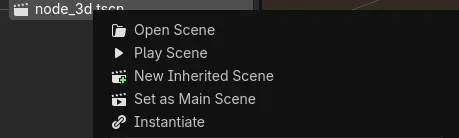
DexterFstone made it possible to play a scene from the file system directly in GH-111941. Now any scene can be played from the file system’s context menu alone; no extra steps required!
Jayden returns with two more editor goodies in GH-119103, aiming to expand the QOL for our FileSystem logic. The first of these features is the ability to zoom in/out of the window with a mouse’s scrollwheel. By simply holding Ctrl while hovering over a FileSystem window, the contents will either grow or shrink upon scrolling the mouse up or down respectively.
Next up is glob-based searching. Sometimes you want to find a type of file or something with a specific prefix, without necessarily narrowing it down to a specific file. By utilizing glob-based search, now your results can explicitly capture whatever use-case you desire.
Michael Alexsander keeps the editor train rolling with another highly-requested feature: runtime manipulation of CanvasItems! Thanks to his work in GH-122510, the following functionality is now fully integrated within Godot 4.8 (lifted verbatim from the original PR):
- Movement, resizing, rotation, scaling, and pivot modification of
CanvasItems, together with its own toolbar. - Full undo/redo support, unified in the editor’s undo/redo manager.
- Added the ability to open scenes by double-clicking them in the game. Just like how it’s done in the editor.
- Improved remote shortcut handling. Which is now funneled into a single debugger message, and triggers the pressed visual on the buttons.
- Improved mouse cursor updates in the editor. Now they trigger immediately rather than after an action is taken with the mouse again.
We’ll end our editor highlights with symbol renaming, an experimental feature brought to us by Tomasz with GH-117949. With this, renaming a symbol will properly propogate that logic across the project, uniformly applying the rename where relevant.
And more:
- Add an option to run the project upgrade tool when updating to a new Godot version (GH-119466).
- Add Clear Project Cache option (GH-120093).
- Add replace preview to Find in Files (GH-122659).
- Add toggle button for texture preview metadata overlay (GH-117216).
- Automatically create default resources in the editor for many objects (GH-88647).
- Clean and simplify
Inspectorheader (GH-117499). - Embed the game view in the main editor window as the default (GH-120736).
- Fix metadata formatting in inspector (GH-108878).
- List monitor resolutions and refresh rates in editor Copy System Info (GH-122809).
- Make main screen dock colors more readable (GH-122903).
- Show doc tooltips in quick settings (GH-121278).
- Show enum integer values in inspector tooltips (GH-102734).
- Show inspector warning on deprecated properties (GH-121364).
- Turn the script method outline into a
Tree(GH-121534). - Use VHS Circle as the default editor color picker shape (GH-110615).
GDScript
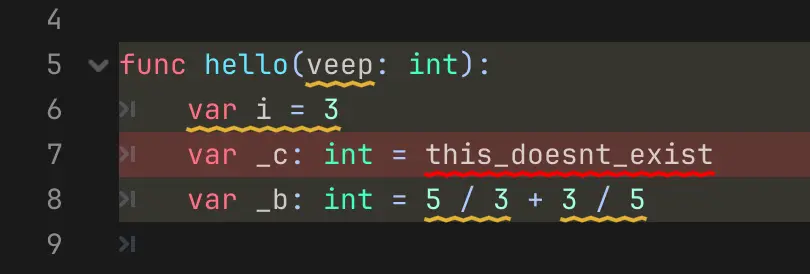
Courtesy of Malcolm Anderson in GH-119588, the debugging process for GDScript will become much more streamlined thanks to the direct and immediate information provided by underlined warnings. While you would previously have a line with a warning/error be highlighted if a problem existed, it highlighted the entire line, which both obfuscated the problem and risked multiple issues being hidden if they existed on the same line. With these changes, only the relevant portions of a given line will be underlined. For instance, the following codeblock would’ve previously been highlighted in its entirety:
And more:
- Disallow strings as comments (GH-121833).
- Fix shutdown crash when
ScriptInstancereferences its owner (GH-121762). - Improve performance for Syntax Highlighting (GH-123320).
- Make language shutdown more crash resilient (GH-120976).
GUI
Every developer knows the struggle of text container constraints all too well. No matter how reasonable you think your font scale is, or what kind of variable text you believe can make it in, a translation string or player input will inevitably break those bounds. Even if you actively and thoroughly filter all input length at all times, that’s still a lot of code upkeep and boilerplating across different areas of your project to achieve the desired effect.
Ismail Ivanov is one of many who felt this struggle of our text container constraints, and decided to do something about it. GH-116791 grants Label and RichTextLabel resize-to-fit functionality, utilizing three newly-added properties: auto_font_size, min_font_size, and max_font_size.
One of the most common requests we’ve seen for improving Tree functionality is the ability to support “sticky items”. That is: the ability for a given line to stick to the top if it represents a foldable region. Koliur Rahman is no stranger to integrating popular editor requests, so it was only a matter of time before they delivered the desired functionality in GH-115697.
And more:
- Add
formatproperty to SpinBox and deprecateprefix/suffix(GH-103998). - Add new default algorithm of automatic focus strategy for
Controlnodes (GH-120631). - Audio: Add theme sound items and playback on common UI events (GH-111455).
- TabBar: Add options for tab sizing strategy (GH-113385).
- Use OS taskbar progress when
ProgressDialogis shown (GH-121505).
Input
Many of our existing GUI items have received native touch support in 4.8, warranting a separate input-focused section dedicated to showcasing their new functionality. All of the following featured items come courtesy of Anish Kumar.
Starting with GH-119706’s two-for-one package deal, both TextEdit and CodeEdit received the following new functionality:
- Tap (press → release): Positions the cursor and opens the virtual keyboard.
- Drag (press → drag → release): scrolls the text content, including inertial scrolling support.
- This extends to the code completion popup, which previously could not be scrolled via touch input.
- Text selection:
- Double-tap selects a word.
- Double-tap, hold, and drag selects the portion you’re hovering over.
TabBar received similar treatment, and is especially easy to showcase thanks to the main screen’s recent conversion to docks, though this functionality will be available to any and all TabBar instances.
PopupMenu is similarly simple to convey through the editor, and is equally available to any and all instances of PopupMenu.
Physics
aterray, in collaboration with Ricardo Buring and Mikael Hermansson, implemented non-allocating classes for PhysicsDirectSpaceState2D and PhysicsDirectSpaceState3D in GH-113970. By leveraging these new methods, result objects can be successfully reused to avoid unnecessary dictionary and array allocations on every call.
var result := PhysicsCastMotionResult3D.new()

func _physics_process(delta: float) -> void:
	if direct_space_state.cast_motion_into(params, result):
		...
These new objects are strongly typed, meaning the need for manual type declarations and dictionary lookups are no longer required.
# Old implementation:
var dict := direct_space_state.intersect_ray(params)

if dict:
	# Cannot infer the type of "normal"
	# var normal := dict["normal"]
	var normal: Vector3 = dict["normal"]

# New implementation:
var result := PhysicsIntersectRayResult3D.new()

if direct_space_state.intersect_ray_into(params, result):
	var normal := result.get_normal() # Inferred as Vector3.
	var position := result.get_position() # Inferred as Vector3.
And more:
- Add
get_velocity_at_(local)_position()toRigidBody2D(GH-121142) andRigidBody3D(GH-121122). - Replace
NOTIFICATION_DEBUG_COLLISIONS_HINT_CHANGEDwith a signal (GH-102963). - Thirdparty: Update to Jolt Physics 5.6.0 (GH-121260).
Platforms
Android
While Godot supports exporting projects to Android, we sympathize with those developers who’ve struggled with the busywork that comes with it. That is: handling the SDK setup for Android and Java beforehand. Nobody is more familiar with this workflow than Fredia Huya-Kouadio, which is why he took to streamlining the entire process in GH-121849. Now, at the click of a button, the editor will take care of downloading, setting up, and managing the Android and Java SDKs automatically!
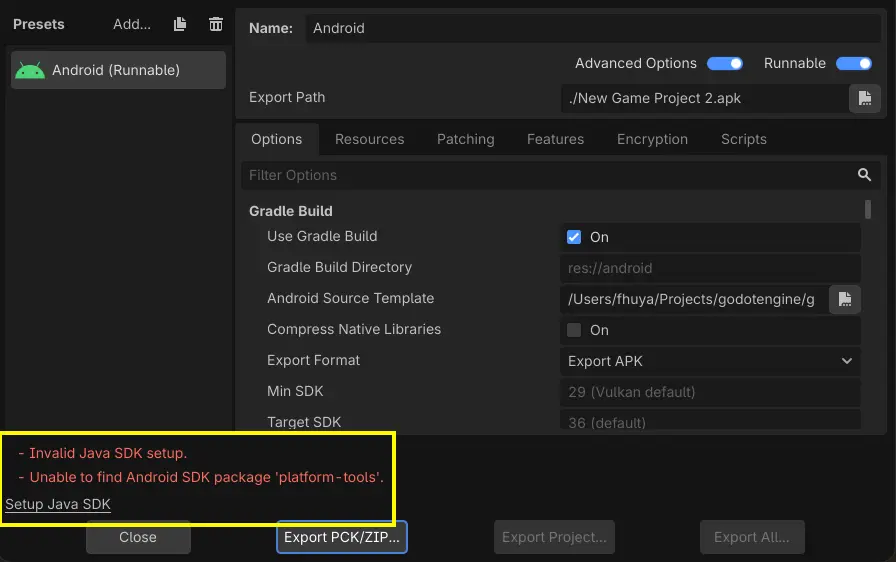
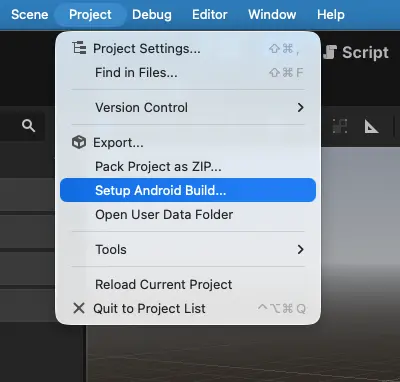
And more:
- Editor: Enable screen orientation change on large screens and in Project Manager (GH-121387).
- Editor: Update game menu bar to match desktop editor (GH-119156).
- Implement
OS::get_processor_name()for Android (GH-120896).
macOS
Starting with 4.8 beta 1, macOS binaries will be distributed as separate architectures. This is thanks to bruvzg introducing the concept in GH-123112, enabling the binaries that we distribute to be much more compact by default. The option for universal packages still exists and functions as it always has, but for the sake of streamlining our outputs and keeping in-line with the amount of size reduction efforts that’ve occurred this cycle, we’ll be moving forward with the individual architectures as our default for official distribution.
And more:
- Export: macOS: Add architecture selector to the export options (GH-119708).
- Force reset main menu on app activation (GH-124172).
- Input: Fix removal of last key down event before IME activation (GH-122799).
Windows
We recently released a dedicated blog post that goes into detail on how we fixed high polling rate mice on Windows in Godot. Those wanting a deeper dive are encouraged to read the changes for themselves, though the improvements speak for themselves:
| Before | After |
|---|---|
And more:
- Implement support for desktop toast notifications (no WinRT/C++) (GH-121711).
- Replace WinRT/C++ dependency with custom COM+ code (GH-121633).
Rendering and shaders
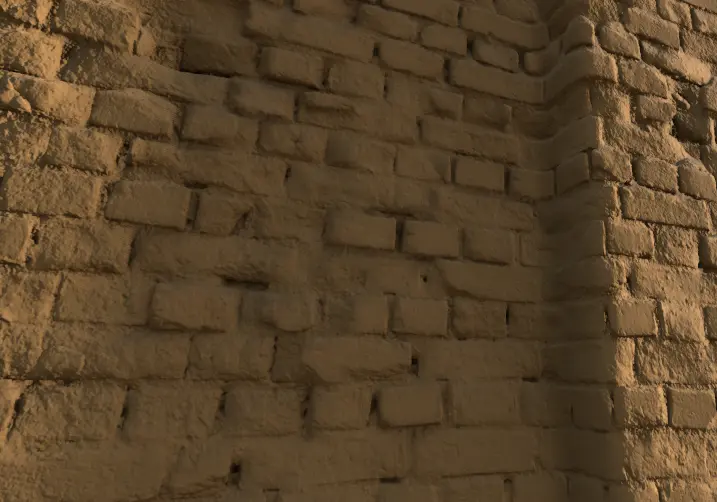
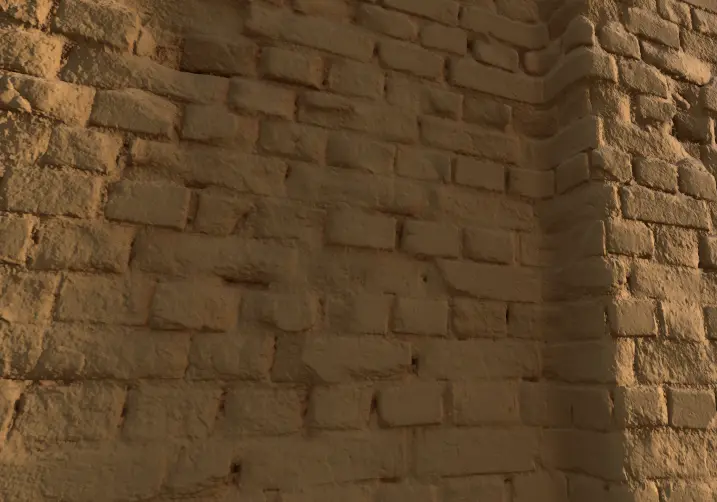
KenzieMac130 starts out our rendering highlights strong with an incredibly impressive first-time contribution in GH-115426, which introduces multi-bounce ambient occlusion approximation. Previously, ambient occlusion in Godot failed to account for interreflections, meaning scenes were over-darkened in practice. Moving forward, we’ll be able to leverage a low-cost approximation of these interreflections, providing a more vibrant and accurate representation of what a given surface “should” look like.
As cited in the PR, this implementation is based upon a method from this 2016 Siggraph presentation, the technique of which has been adoped as industry-standard across multiple other engines. Those seeking a more technical breakdown are strongly encouraged to view the presentation itself!
| Disabled | Enabled |
|---|---|
 |  |
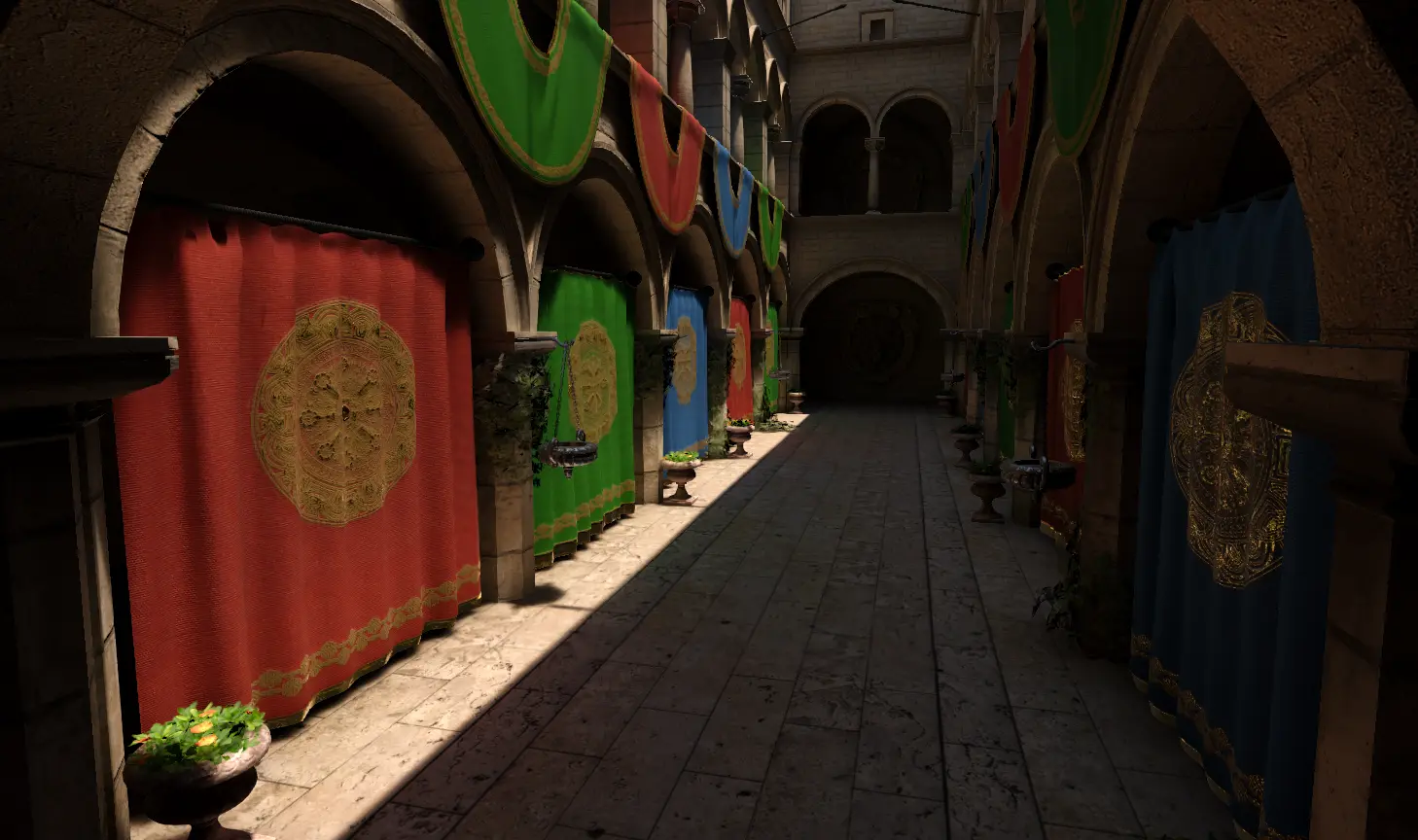
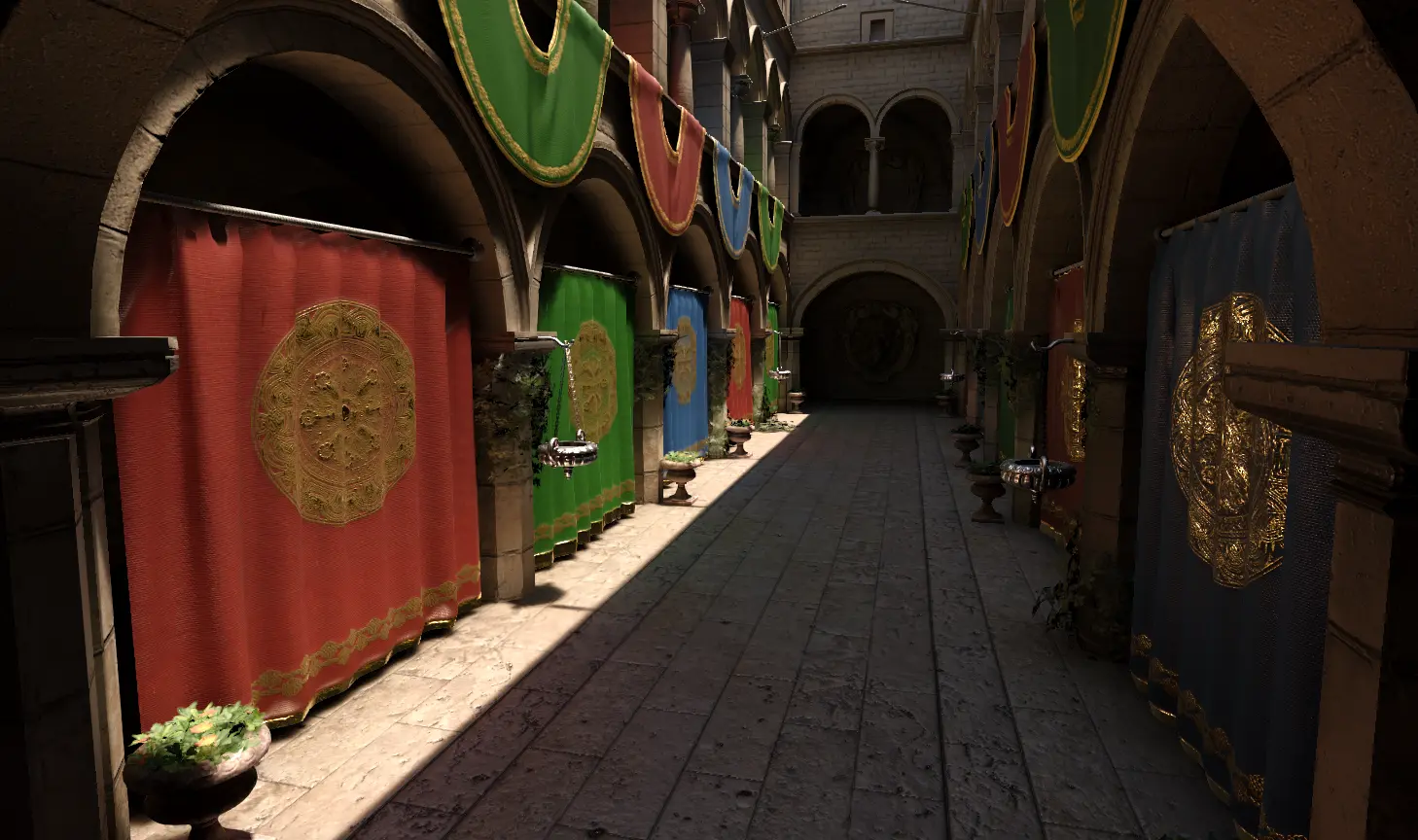
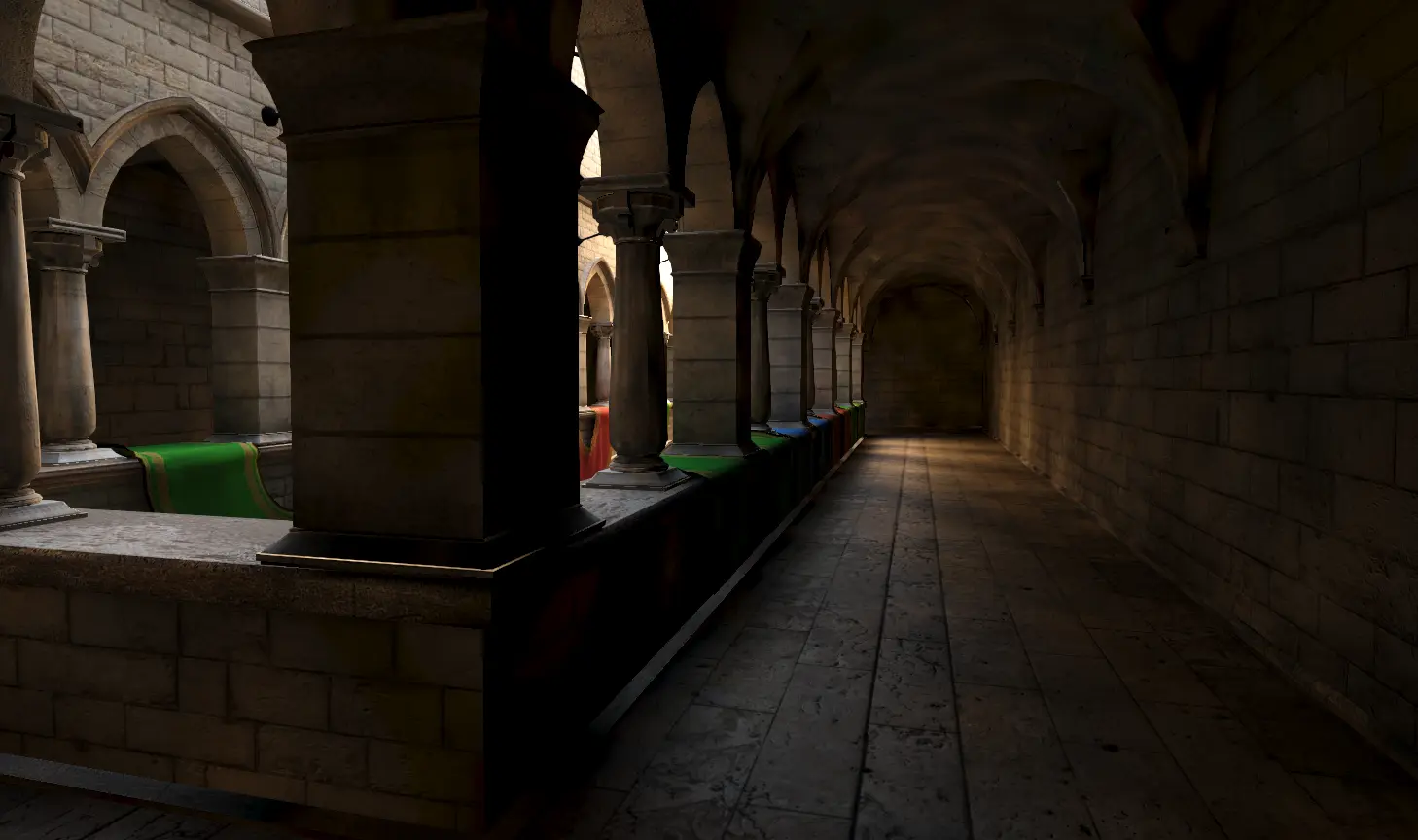
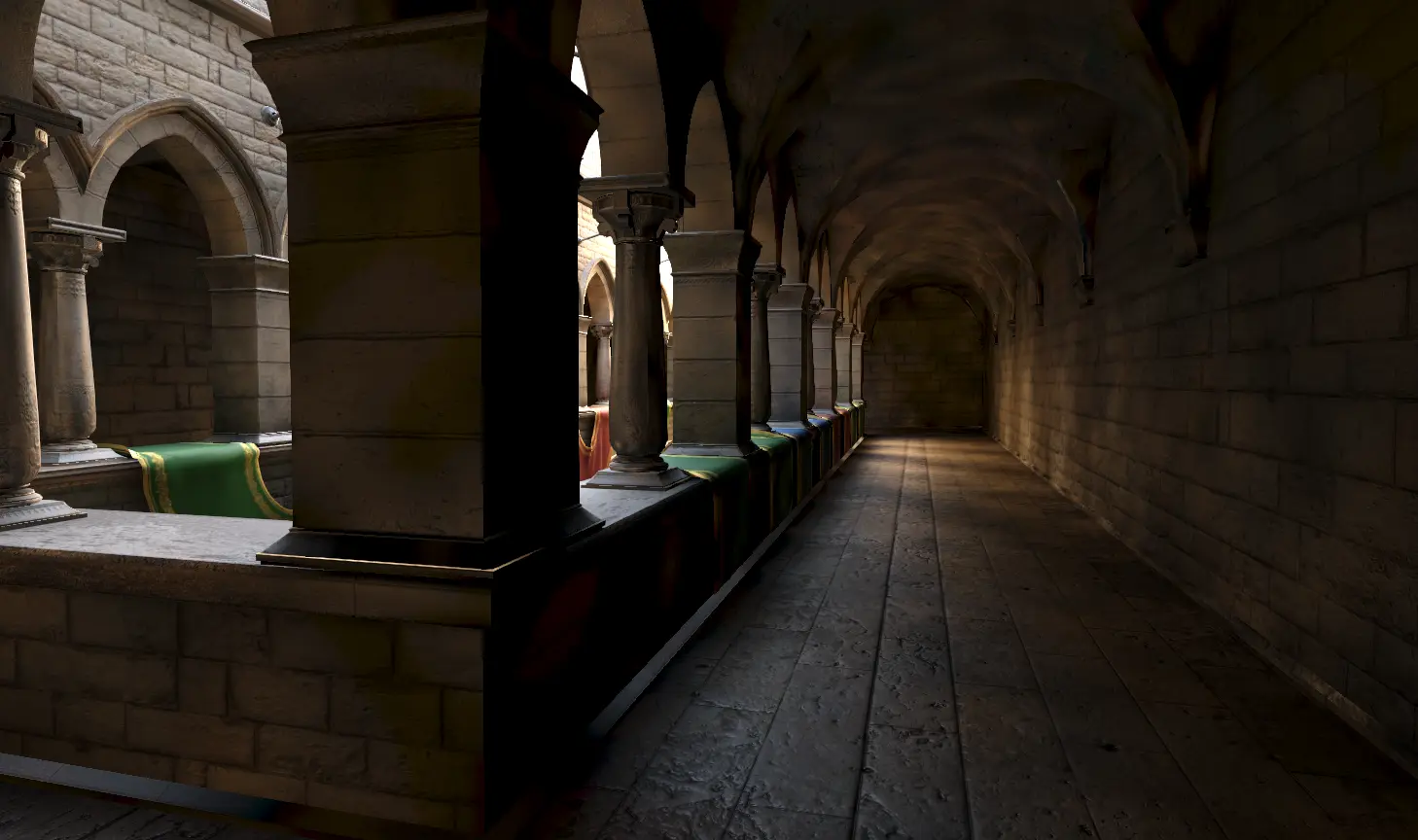
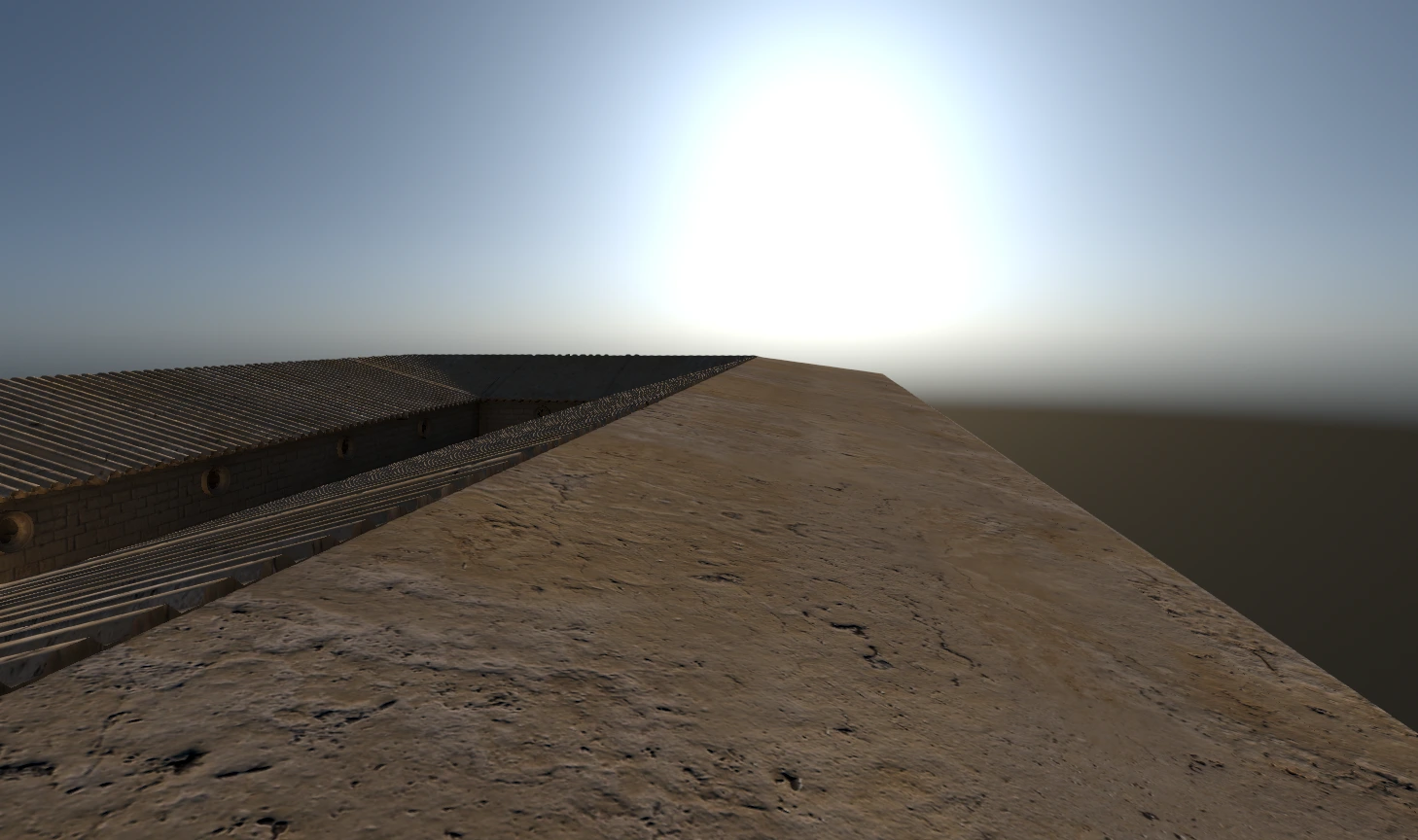
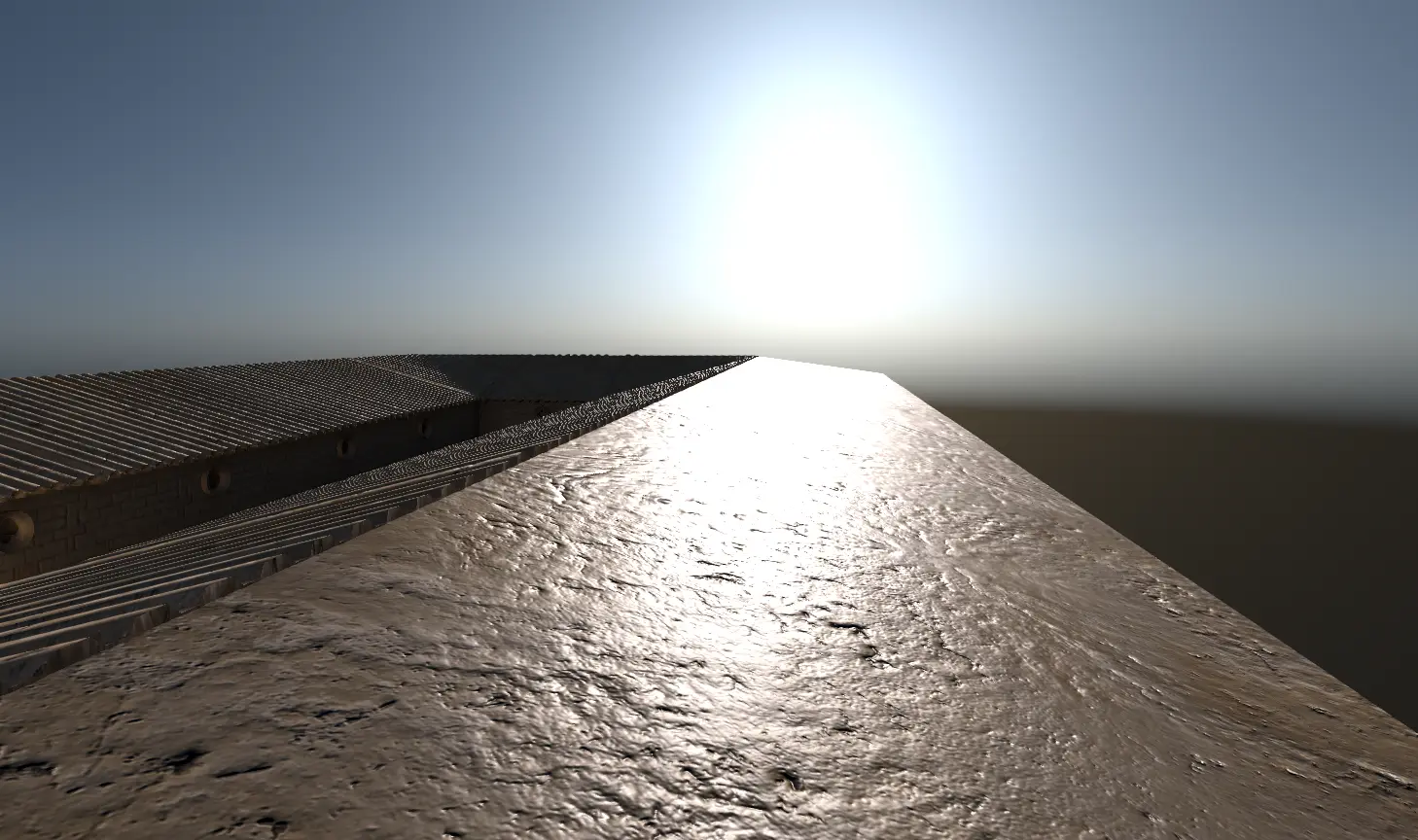
Much like the previous point, Juan Manuel builds upon an existing foundation—this time by longtime member Hugo Locurcio—in order to introduce directional lightmap specular light to the engine with GH-109737. This addresses an existing issue with the way baked directional light set as static interacted with the LightmapGI set to directional, as this combination failed to bake any specular information. Thanks to the aforementioned PR, any directional specular information can not only be baked into the LightmapGI, but will produce results comparable to realtime directional light!
Those who want more a more technical breakdown on the subject are encouraged to watch this 2018 GDC presentation. For practical examples, we welcome you to enjoy this small sample of comparisons pulled from the PR:
| Disabled | Enabled |
|---|---|
 |  |
 |  |
 |  |
In the context of an engine such as Godot, “texture streaming” refers to the ability to dynamically load and unload images based on a camera’s relative position. Such a system would allow games to handle significantly more visible textures at any given point in time, which is why such a feature was one of the community’s most desired. Unfortunately, like most highly-desired features, it’s much easier said than done, and the “best” implementation direction isn’t exactly set in stone.
The approach that Trevor Davenport took in GH-113429 was mip-level texture streaming. That is: Godot now only loads the necessary mipmap of a texture, representing smaller or less detailed versions of the base texture when far away or otherwise obfuscated. This results in a significant reduction of VRAM requirements for textures, particularly for 3D titles with large, open worlds.
Speaking of mipmaps: an existing issue in the engine was actually caused by their use, albeit indirectly. Certain material shaders, such as alpha scissor, would look pretty rough at long distances; this was a direct result of mipmap levels causing them to overfilter and dissolve away. While technical workarounds do exist, such as using a texture format with built-in alpha coverage like .dds, it’s still too much of a technical hurdle for what should be straightforward.
Kasper Arnklit Frandsen shared the above sentiment, leading him to create GH-104289. This allows any given texture to preserve their alpha data, even when falling back to their scaled-down equivalents.
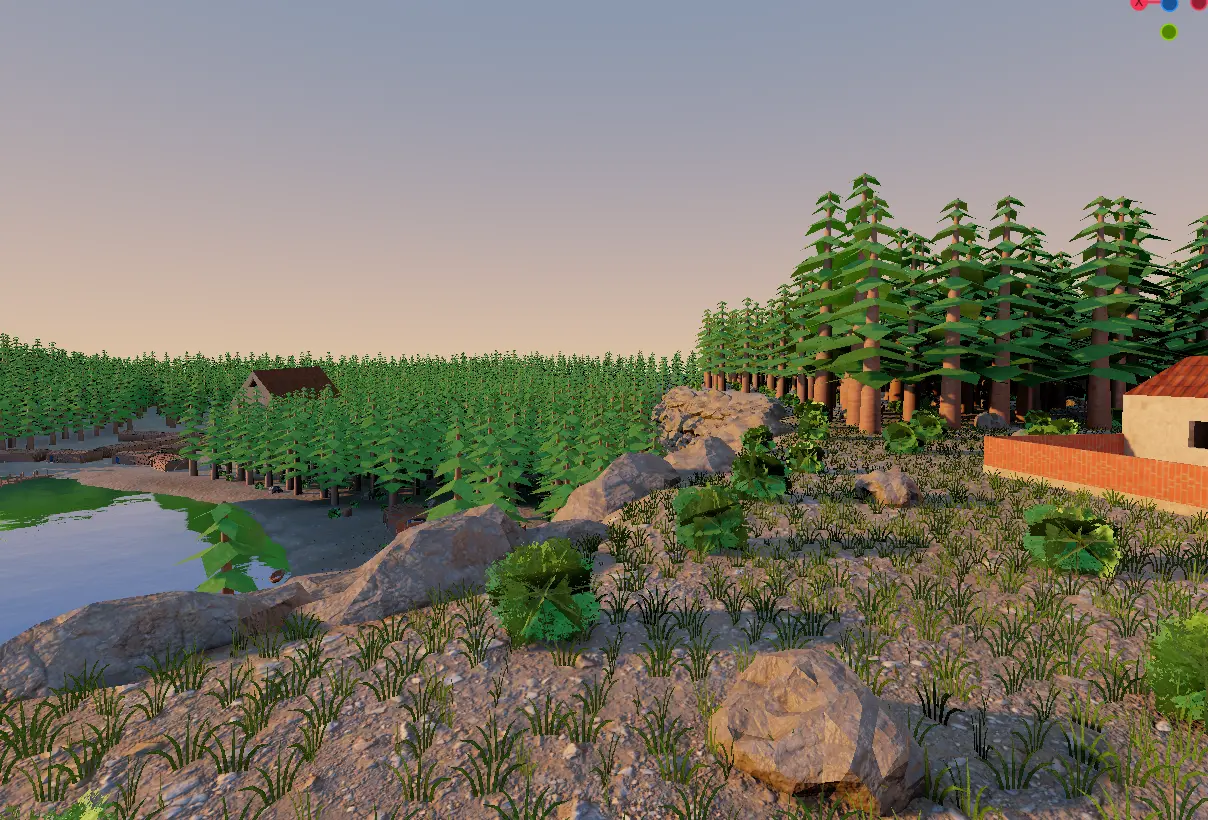
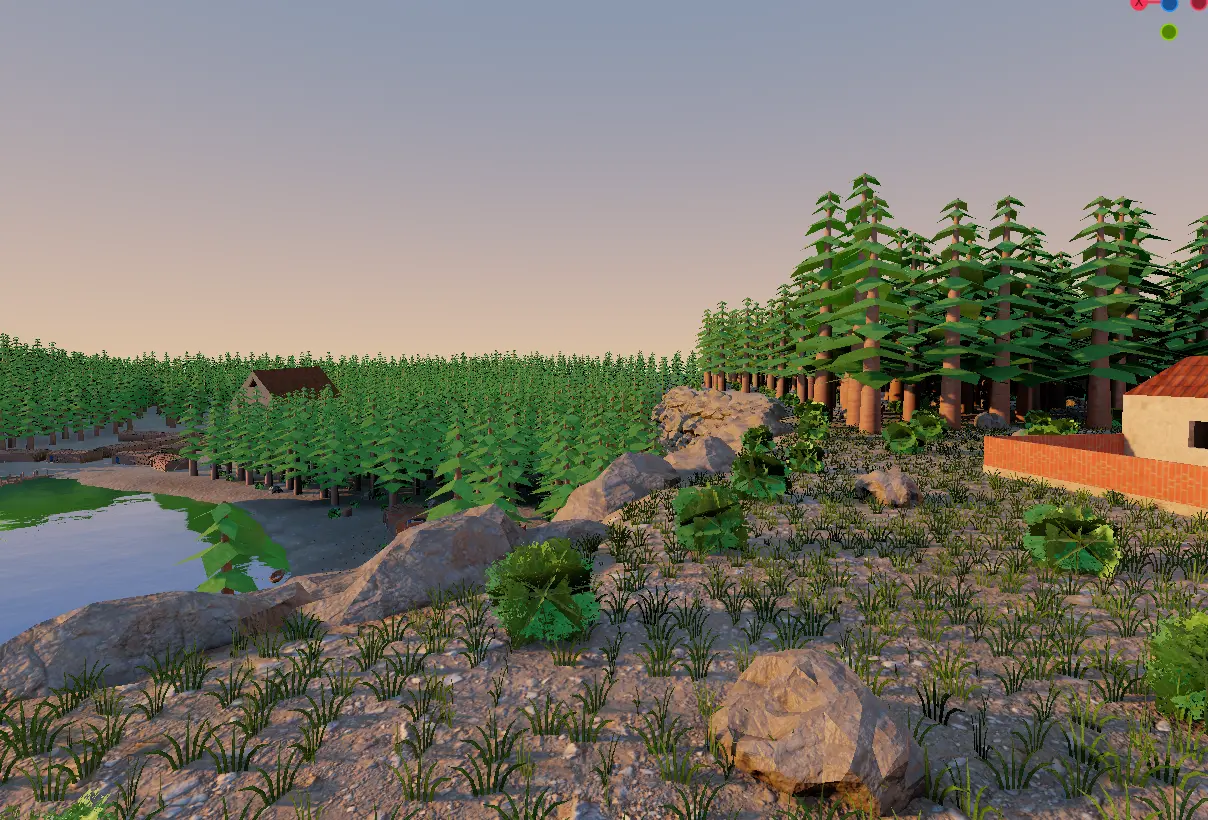
Rudolph Bester ended up using Bend Studios’ approach in his implementation with GH-118045. With these changes, a new option has been added to the environment resource and directional light node to enable screen space contact shadows (SSCS). It creates an R8 shadow texture for each directional light in the scene and blends them with existing shadow maps. This results in performant shadows that don’t compromise their visual quality.
| Disabled | Enabled |
|---|---|
 |  |
While our decals have gotten some attention this development cycle, perhaps the most stand-out addition comes at the hands of Colin O’Rourke. Being the brain behind DrawableTexture, it should come as no surprise that he managed to wrangle them once again with GH-115653, enabling decals to be fully animated.
And more:
- Add decal support to compatibility renderer (GH-118070).
- Add support for ASTC 6x6 and high quality compression profiles (GH-115003).
- Fix directional shadow culling for orthogonal cameras (GH-121775).
- Improve SPIR-V reflection performance (GH-121835).
- Use non-volumetric fog in WorldEnvironment sky reflections (GH-107958).
Shaders
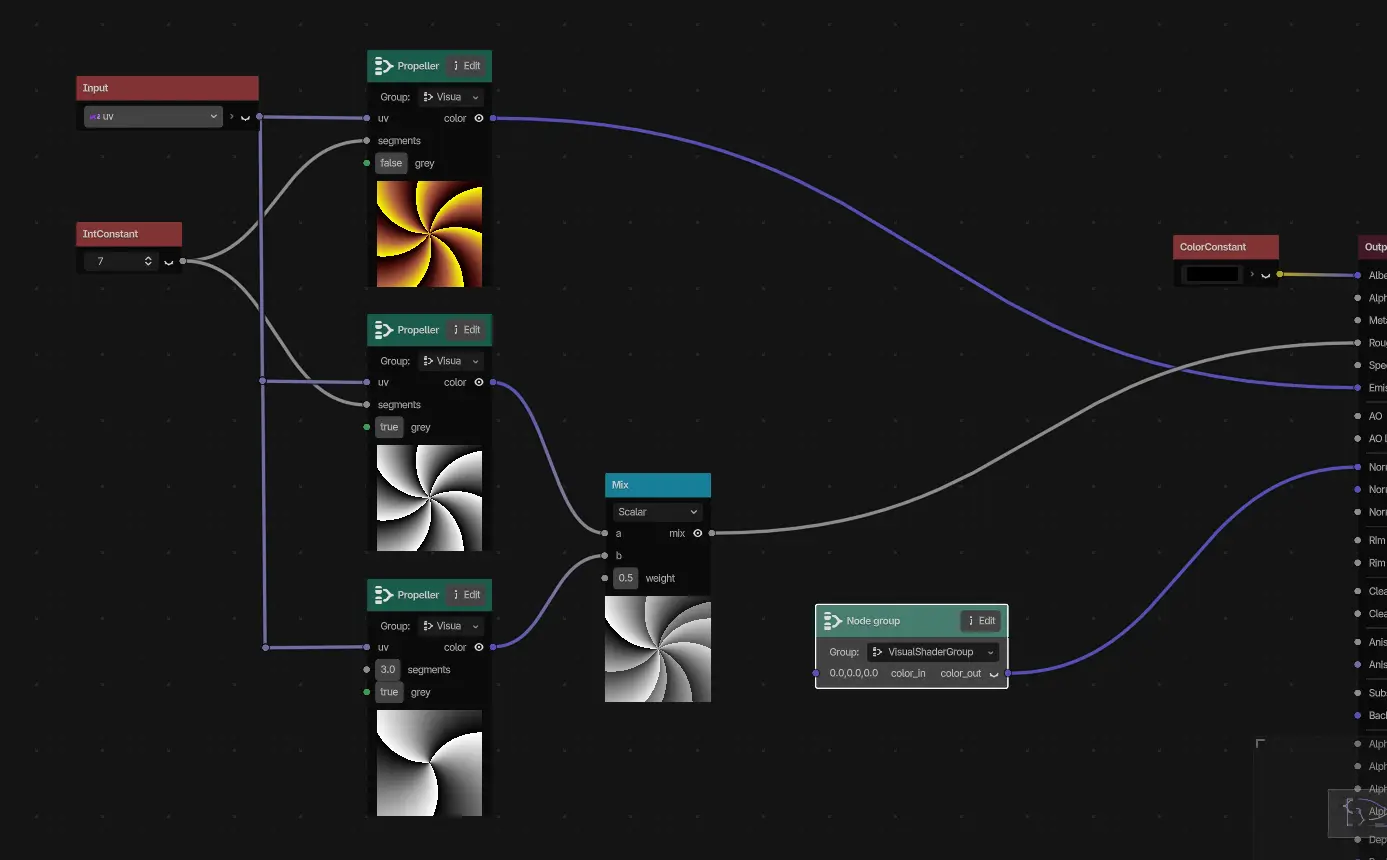
While we’re quite happy with the current state of our visual shader, some pain points have always remained. This is especially true for more complex implementations, as the scope of the graphs could become quite unwieldy over time. It’s no surprise then, that one of the most common requests for the visual shader was a way to reduce or remove the bloat and redundancy that comes from these complex files.
Hendrik Brucker delivered a solution in GH-99404, gracing the visual shader with the versatility and ubiquity of node groups. By leveraging node groups, users can now efficiently encapsulate frequently-used sections of a shader and reuse them across the graph with zero friction. What was once a chaotic mess of boilerplate and difficult-to-parse information is now neatly bundled with dedicated node groups:
And more:
- GDShader: Add implicit conversion of
boolconstants tofloat,int, anduint(GH-120715).
XR
Remember Ricardo Sanchez-Saez, the contributor responsible for native visionOS support? Well, their work hasn’t concluded just yet, as they—along with co-authors Stuart Carnie and huiedenanhai—bring visionOS to new life as a module in GH-109975! With these changes, not only has our build server’s logic dramatically simplified, but this lays the groundwork for tvOS support in the near-future!
When first announced, we promised more information coming soon™, and that promise stands. It’ll be a little while longer still, so we thank you for your patience!
And more:
- Implement multi-layer projection camera (GH-116424).
- visionOS: Add support for hand tracking and PSVR2 controllers on Apple Vision Pro (GH-122567).
Changelog
340 contributors submitted 1523 fixes since the release of 4.7-stable. See our interactive changelog for the complete list of changes. You can also review changes since the 4.8-dev7 snapshot, for a more curated selection of 196 fixes from 87 contributors.
This release is built from commit 4d10419ca.
Downloads
 Linux
Linux macOS
macOS Windows
Standard build includes support for GDScript and GDExtension.
.NET build (marked as mono) includes support for C#, as well as GDScript and GDExtension.
- .NET 10.0 or newer is required for this build, changing the minimal supported version from .NET 8 to 10.
While engine maintainers try their best to ensure that each preview snapshot and release candidate is stable, this is by definition a pre-release piece of software. Be sure to make frequent backups, or use a version control system such as Git, to preserve your projects in case of corruption or data loss.
Known issues
During the beta stage, we focus on solving both regressions (i.e. something that worked in a previous release is now broken) and significant new bugs introduced by new features. You can have a look at our current list of regressions and significant issues which we aim to address before releasing 4.8. This list is dynamic and will be updated if we discover new showstopping issues after more users start testing the beta snapshots.
With every release, we accept that there are going to be various issues which have already been reported but haven’t been fixed yet. See the GitHub issue tracker for a complete list of known bugs.
Bug reports
As a tester, we encourage you to open bug reports if you experience issues with this release. Please check the existing issues on GitHub first, using the search function with relevant keywords, to ensure that the bug you experience is not already known.
In particular, any change that would cause a regression in your projects is very important to report (e.g. if something that worked fine in previous 4.x releases, but no longer works in this snapshot).
Support
Godot is a non-profit, open-source game engine developed by hundreds of contributors in their free time, as well as a handful of part and full-time developers hired thanks to generous donations from the Godot community. A big thank you to everyone who has contributed their time or their financial support to the project!
If you’d like to support the project financially and help us secure our future hires, you can do so using the Godot Development Fund platform managed by the Godot Foundation. There are also several alternative ways to donate which you may find more suitable.