Edit of asset "Static Mesh Merger" Accepted
| Old/Current | New/Edit | |
|---|---|---|
| Title | Static Mesh Merger | Static Mesh Merger |
| Description |
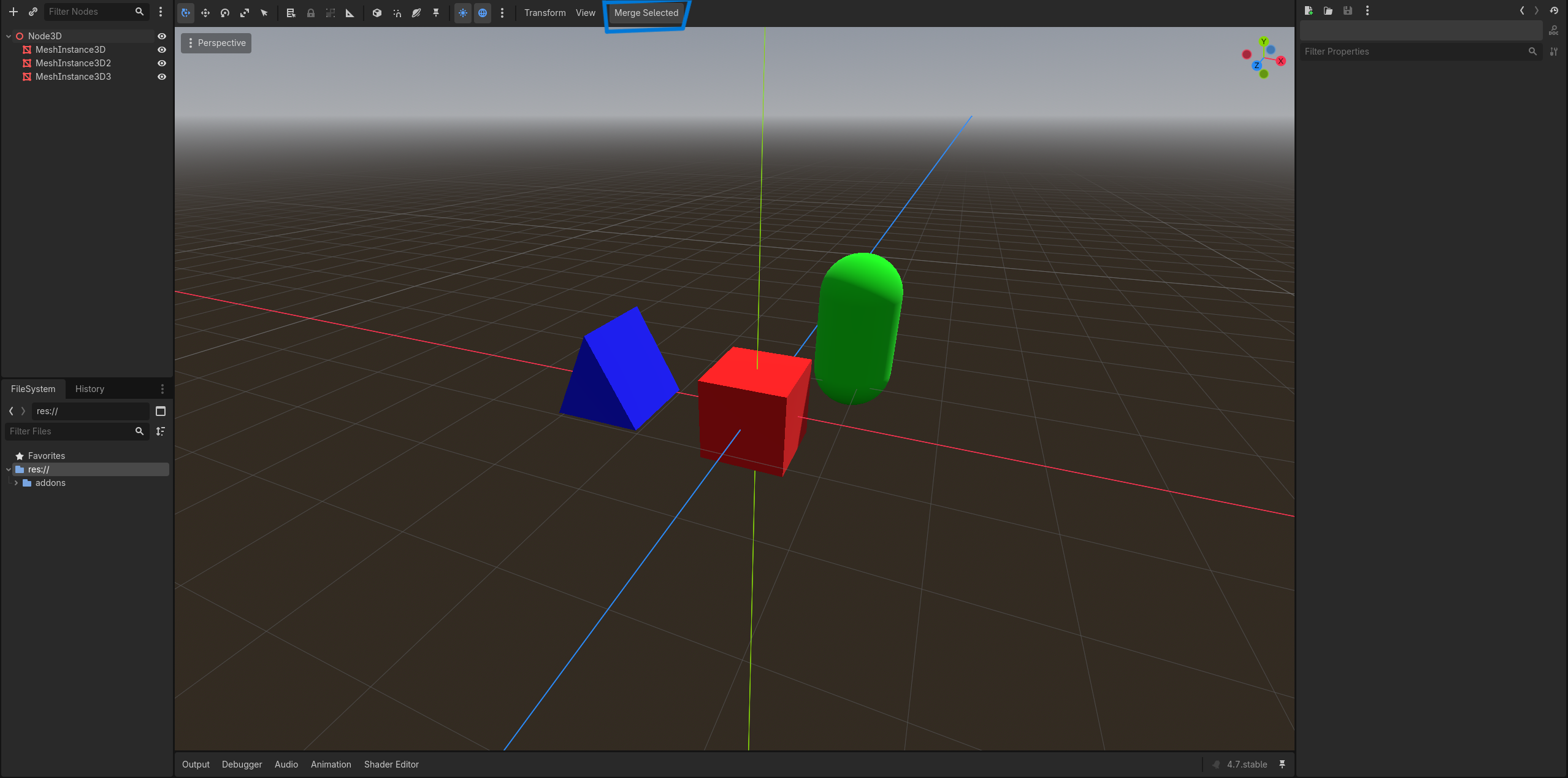
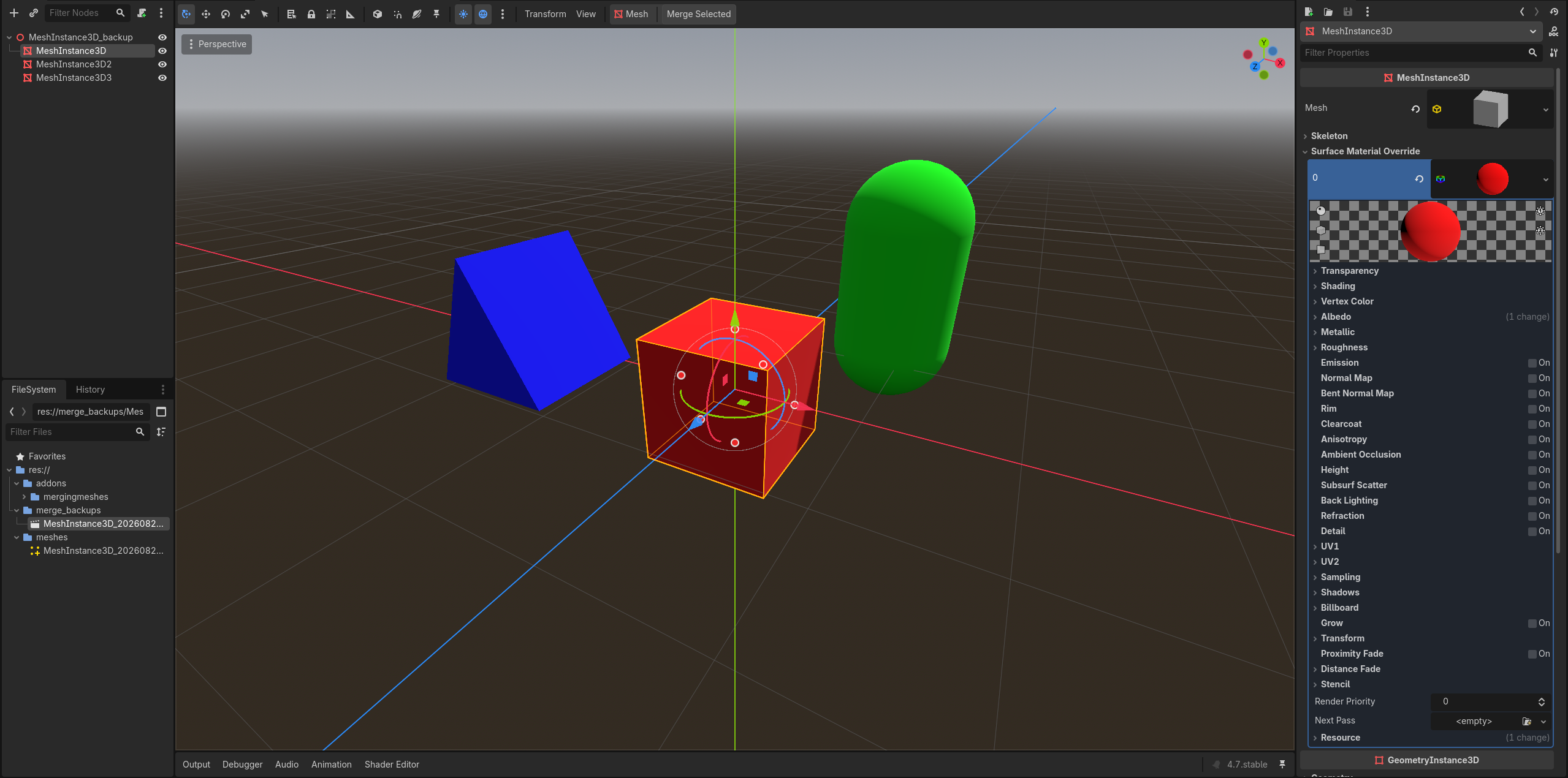
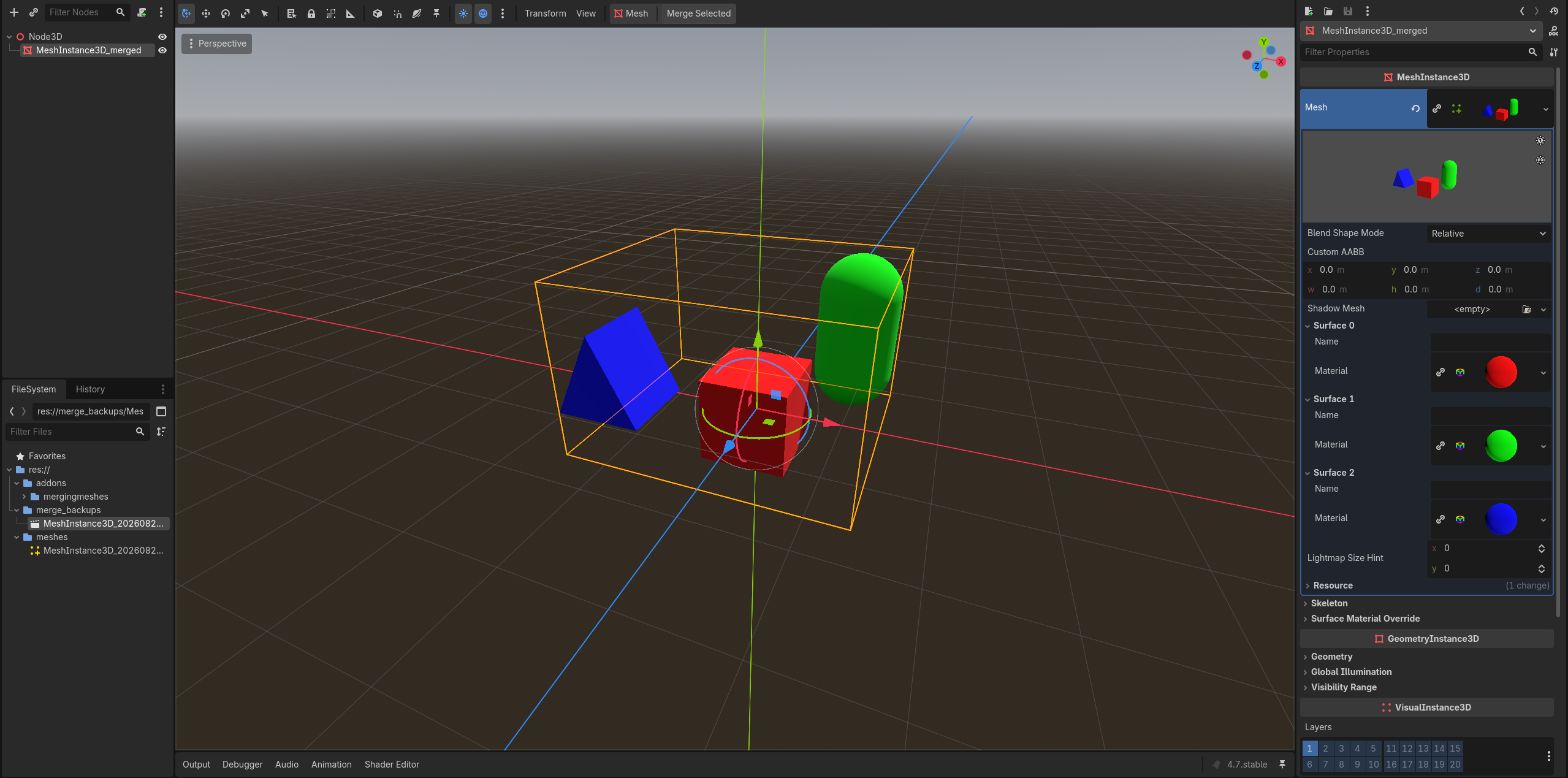
# Static Mesh Merger ### Lightweight static mesh batching for Godot 4 **Mesh Merger** is a lightweight Godot editor plugin that combines multiple static `MeshInstance3D` nodes into a single optimized mesh while preserving existing collision data. Select the meshes you want to merge, click **Merge Selected** in the 3D editor, and Mesh Merger handles the rest. > **Less clutter. Fewer objects. Same geometry. Existing collision preserved.** ## Features * **Merge selected meshes** into a single `ArrayMesh` * **Preserve materials and textures** from the original meshes * **Preserve existing collision hierarchies** without modifying their collision shapes * **Move preserved collision** under the newly created merged mesh * **Remove the original mesh hierarchies** after a successful merge * **Create a new `MeshInstance3D`** containing the merged geometry * **Save merged meshes** as reusable `.res` resources * **Automatically back up original nodes** before making changes * **Keep backup scenes out of exported builds** * **Editor-only workflow** — no runtime systems or scripts required ## Collision Preservation Mesh Merger does **not** attempt to generate, convert, or rebuild collision geometry. If a selected mesh has an existing collision hierarchy such as: ```text MeshInstance3D └── StaticBody3D └── CollisionShape3D ``` the collision hierarchy is preserved without modification. After merging, it becomes part of the new merged mesh hierarchy: ```text MeshInstance3D_merged └── Collision └── StaticBody3D └── CollisionShape3D ``` The original collision shape remains the same resource and shape type. This means Mesh Merger can preserve Godot collision shapes such as: * `BoxShape3D` * `SphereShape3D` * `CapsuleShape3D` * `CylinderShape3D` * `ConvexPolygonShape3D` * `ConcavePolygonShape3D` * Other existing `CollisionShape3D` configurations Mesh Merger simply preserves the collision data that already exists rather than trying to recreate it. > **If your mesh already has collision, Mesh Merger keeps it.** ## Great for Open-World Games Mesh Merger is particularly useful for **large open-world environments** where thousands of static objects can make a scene unnecessarily expensive to manage. Large environments are often built from hundreds or thousands of smaller modular pieces: ```text Open World ├── House │ ├── Wall │ ├── Roof │ ├── Window │ └── Door ├── Rocks ├── Trees ├── Ruins ├── Cliffs └── Decorations ``` Many of these objects never need to move independently. Mesh Merger lets you combine appropriate static sections into larger meshes: ```text Open World ├── Village_merged ├── Forest_merged ├── Ruins_merged ├── Cliffs_merged └── Decorations_merged ``` This can reduce the number of individual scene objects Godot needs to manage while keeping the underlying geometry intact. For open-world projects, you can also merge **smaller logical sections** rather than turning the entire world into one enormous mesh. This keeps your environment modular while still reducing unnecessary object overhead. > **Build your world from modular pieces. Merge the pieces that don't need to stay separate.** ## How It Works Before: ```text Environment ├── Rock_01 ├── Rock_02 ├── Rock_03 ├── Rock_04 ├── Rock_05 └── Rock_06 ``` After clicking **Merge Selected**: ```text Environment └── Rock_merged ``` The individual meshes are combined into one mesh while their materials are preserved. If collision exists, it is preserved as well: ```text Before Environment ├── Rock_01 ├── Rock_02 │ └── StaticBody3D │ └── CollisionShape3D └── Rock_03 ``` becomes: ```text After Environment └── Rock_merged └── Collision └── StaticBody3D └── CollisionShape3D ``` The original collision data is not regenerated or converted. Your original nodes are also backed up automatically, so you have a way to recover them if needed. ## Is This Nanite? **No.** Mesh Merger is nowhere near as sophisticated as Nanite. It does **not** provide: * Virtualized geometry * Hierarchical cluster culling * Automatic geometric LOD * Geometry streaming * Nanite-style visibility management Instead, Mesh Merger takes a much simpler approach: > **Combine lots of static objects into fewer objects.** Think of it as a small, editor-side **static mesh batching tool** rather than a Nanite replacement. ## Best Used For Mesh Merger is designed primarily for **static level geometry**, including: * Open-world environments * Environment pieces * Buildings * Rocks * Props * Decorations * Modular level sections * Large static structures * Other geometry that doesn't need to move independently It's especially useful when a scene contains large numbers of small static meshes that don't need to remain separate at runtime. ## Safety First Mesh Merger creates a backup **before modifying the scene**. Backups are stored in: ```text res://merge_backups/ ``` The plugin also prevents these backup scenes from being included in exported builds. Merged meshes are stored in: ```text res://meshes/ ``` So your original scene data isn't simply thrown into the void. ## Usage 1. Select the `MeshInstance3D` nodes you want to merge. 2. Click **Merge Selected** in the 3D editor. 3. Mesh Merger creates a backup. 4. The meshes are combined into a single `ArrayMesh`. 5. Existing collision hierarchies are preserved without modification. 6. The original mesh hierarchies are removed. 7. A new `MeshInstance3D` is created with the merged geometry. 8. Preserved collision hierarchies are placed under the new merged mesh. 9. The merged mesh resource is saved for reuse. That's it. ## Requirements * **Godot 4.x** * Static `MeshInstance3D` geometry ## Limitations Mesh Merger is intentionally simple. It does **not** automatically provide: * Runtime mesh merging * Dynamic object support * LOD generation * Occlusion culling * Geometry streaming * Automatic collision generation * Collision shape conversion * Nanite-style virtualized geometry Collision is **preserved**, not generated. If an object has no existing collision, Mesh Merger will not create collision for it. If an object needs to move independently, animate independently, or otherwise remain a separate object, **don't merge it**. ## Why? Godot can handle a lot of geometry, but a scene containing thousands of individual static objects can create unnecessary overhead. Mesh Merger provides a simple editor-side solution: **Build your level normally → add collision where needed → merge what doesn't need to stay separate → ship a cleaner scene.** No runtime plugin logic. No complicated setup. Just merge and go. --- ### Status **Early release / actively developing** If you find a bug or have an idea for an improvement, feel free to open an issue or contribute. |
# Static Mesh Merger ### Lightweight static mesh batching for Godot 4 **Mesh Merger** is a lightweight Godot editor plugin that combines multiple static `MeshInstance3D` nodes into a single optimized mesh while preserving existing collision data. Select the meshes you want to merge, click **Merge Selected** in the 3D editor, and Mesh Merger handles the rest. > **Less clutter. Fewer objects. Same geometry. Existing collision preserved.** ## Features * **Merge selected meshes** into a single `ArrayMesh` * **Preserve materials and textures** from the original meshes * **Preserve existing collision hierarchies** without modifying their collision shapes * **Move preserved collision** under the newly created merged mesh * **Remove the original mesh hierarchies** after a successful merge * **Create a new `MeshInstance3D`** containing the merged geometry * **Save merged meshes** as reusable `.res` resources * **Automatically back up original nodes** before making changes * **Keep backup scenes out of exported builds** * **Editor-only workflow** — no runtime systems or scripts required ## Collision Preservation Mesh Merger does **not** attempt to generate, convert, or rebuild collision geometry. If a selected mesh has an existing collision hierarchy such as: ```text MeshInstance3D └── StaticBody3D └── CollisionShape3D ``` the collision hierarchy is preserved without modification. After merging, it becomes part of the new merged mesh hierarchy: ```text MeshInstance3D_merged └── Collision └── StaticBody3D └── CollisionShape3D ``` The original collision shape remains the same resource and shape type. This means Mesh Merger can preserve Godot collision shapes such as: * `BoxShape3D` * `SphereShape3D` * `CapsuleShape3D` * `CylinderShape3D` * `ConvexPolygonShape3D` * `ConcavePolygonShape3D` * Other existing `CollisionShape3D` configurations Mesh Merger simply preserves the collision data that already exists rather than trying to recreate it. > **If your mesh already has collision, Mesh Merger keeps it.** ## Great for Open-World Games Mesh Merger is particularly useful for **large open-world environments** where thousands of static objects can make a scene unnecessarily expensive to manage. Large environments are often built from hundreds or thousands of smaller modular pieces: ```text Open World ├── House │ ├── Wall │ ├── Roof │ ├── Window │ └── Door ├── Rocks ├── Trees ├── Ruins ├── Cliffs └── Decorations ``` Many of these objects never need to move independently. Mesh Merger lets you combine appropriate static sections into larger meshes: ```text Open World ├── Village_merged ├── Forest_merged ├── Ruins_merged ├── Cliffs_merged └── Decorations_merged ``` This can reduce the number of individual scene objects Godot needs to manage while keeping the underlying geometry intact. For open-world projects, you can also merge **smaller logical sections** rather than turning the entire world into one enormous mesh. This keeps your environment modular while still reducing unnecessary object overhead. > **Build your world from modular pieces. Merge the pieces that don't need to stay separate.** ## How It Works Before: ```text Environment ├── Rock_01 ├── Rock_02 ├── Rock_03 ├── Rock_04 ├── Rock_05 └── Rock_06 ``` After clicking **Merge Selected**: ```text Environment └── Rock_merged ``` The individual meshes are combined into one mesh while their materials are preserved. If collision exists, it is preserved as well: ```text Before Environment ├── Rock_01 ├── Rock_02 │ └── StaticBody3D │ └── CollisionShape3D └── Rock_03 ``` becomes: ```text After Environment └── Rock_merged └── Collision └── StaticBody3D └── CollisionShape3D ``` The original collision data is not regenerated or converted. Your original nodes are also backed up automatically, so you have a way to recover them if needed. ## Is This Nanite? **No.** Mesh Merger is nowhere near as sophisticated as Nanite. It does **not** provide: * Virtualized geometry * Hierarchical cluster culling * Automatic geometric LOD * Geometry streaming * Nanite-style visibility management Instead, Mesh Merger takes a much simpler approach: > **Combine lots of static objects into fewer objects.** Think of it as a small, editor-side **static mesh batching tool** rather than a Nanite replacement. ## Best Used For Mesh Merger is designed primarily for **static level geometry**, including: * Open-world environments * Environment pieces * Buildings * Rocks * Props * Decorations * Modular level sections * Large static structures * Other geometry that doesn't need to move independently It's especially useful when a scene contains large numbers of small static meshes that don't need to remain separate at runtime. ## Safety First Mesh Merger creates a backup **before modifying the scene**. Backups are stored in: ```text res://merge_backups/ ``` The plugin also prevents these backup scenes from being included in exported builds. Merged meshes are stored in: ```text res://meshes/ ``` So your original scene data isn't simply thrown into the void. ## Usage 1. Select the `MeshInstance3D` nodes you want to merge. 2. Click **Merge Selected** in the 3D editor. 3. Mesh Merger creates a backup. 4. The meshes are combined into a single `ArrayMesh`. 5. Existing collision hierarchies are preserved without modification. 6. The original mesh hierarchies are removed. 7. A new `MeshInstance3D` is created with the merged geometry. 8. Preserved collision hierarchies are placed under the new merged mesh. 9. The merged mesh resource is saved for reuse. That's it. ## Requirements * **Godot 4.x** * Static `MeshInstance3D` geometry ## Limitations Mesh Merger is intentionally simple. It does **not** automatically provide: * Runtime mesh merging * Dynamic object support * LOD generation * Occlusion culling * Geometry streaming * Automatic collision generation * Collision shape conversion * Nanite-style virtualized geometry Collision is **preserved**, not generated. If an object has no existing collision, Mesh Merger will not create collision for it. If an object needs to move independently, animate independently, or otherwise remain a separate object, **don't merge it**. ## Why? Godot can handle a lot of geometry, but a scene containing thousands of individual static objects can create unnecessary overhead. Mesh Merger provides a simple editor-side solution: **Build your level normally → add collision where needed → merge what doesn't need to stay separate → ship a cleaner scene.** No runtime plugin logic. No complicated setup. Just merge and go. --- ### Status **Early release / actively developing** If you find a bug or have an idea for an improvement, feel free to open an issue or contribute. |
| Category | 3D Tools | 3D Tools |
| License | MIT | MIT |
| Repository Provider | GitHub | GitHub |
| Repository Url | https://github.com/EverettM12/Static-Mesh-Merger | https://github.com/EverettM12/Static-Mesh-Merger |
| Issues Url | https://github.com/EverettM12/Static-Mesh-Merger/issues | https://github.com/EverettM12/Static-Mesh-Merger/issues |
| Godot version | Godot 4.0 | Godot 4.0 |
| Version String | 1.0.1 | 1.0.1 |
| Download Commit | 14f3d2378b74f52d7e9e0e9a63d0b21cec650743 | 14f3d2378b74f52d7e9e0e9a63d0b21cec650743 |
| Download Url (Computed) | https://github.com/EverettM12/Static-Mesh-Merger/archive/14f3d2378b74f52d7e9e0e9a63d0b21cec650743.zip | https://github.com/EverettM12/Static-Mesh-Merger/archive/14f3d2378b74f52d7e9e0e9a63d0b21cec650743.zip |
| Icon Url |
https://raw.githubusercontent.com/EverettM12/Static-Mesh-Merger/main/addons/mergingmeshes/plugin.png

|
https://raw.githubusercontent.com/EverettM12/Static-Mesh-Merger/main/addons/mergingmeshes/plugin.png
|
| Preview Insert | ||
|---|---|---|
| Type | image | |
| Image/Video URL |
https://raw.githubusercontent.com/EverettM12/Static-Mesh-Merger/main/button.png
|
|
| Thumbnail |
|
|
| Preview Insert | ||
|---|---|---|
| Type | image | |
| Image/Video URL |
https://raw.githubusercontent.com/EverettM12/Static-Mesh-Merger/main/backup.png
|
|
| Thumbnail |
|
|
| Preview Insert | ||
|---|---|---|
| Type | image | |
| Image/Video URL |
https://raw.githubusercontent.com/EverettM12/Static-Mesh-Merger/main/finalproduct.png
|
|
| Thumbnail |
|
|