Edit of asset "Godot Yandex Ads (Android)" Accepted
| Old/Current | New/Edit | |
|---|---|---|
| Title | Godot Yandex Ads (Android) | Godot Yandex Ads (Android) |
| Description |
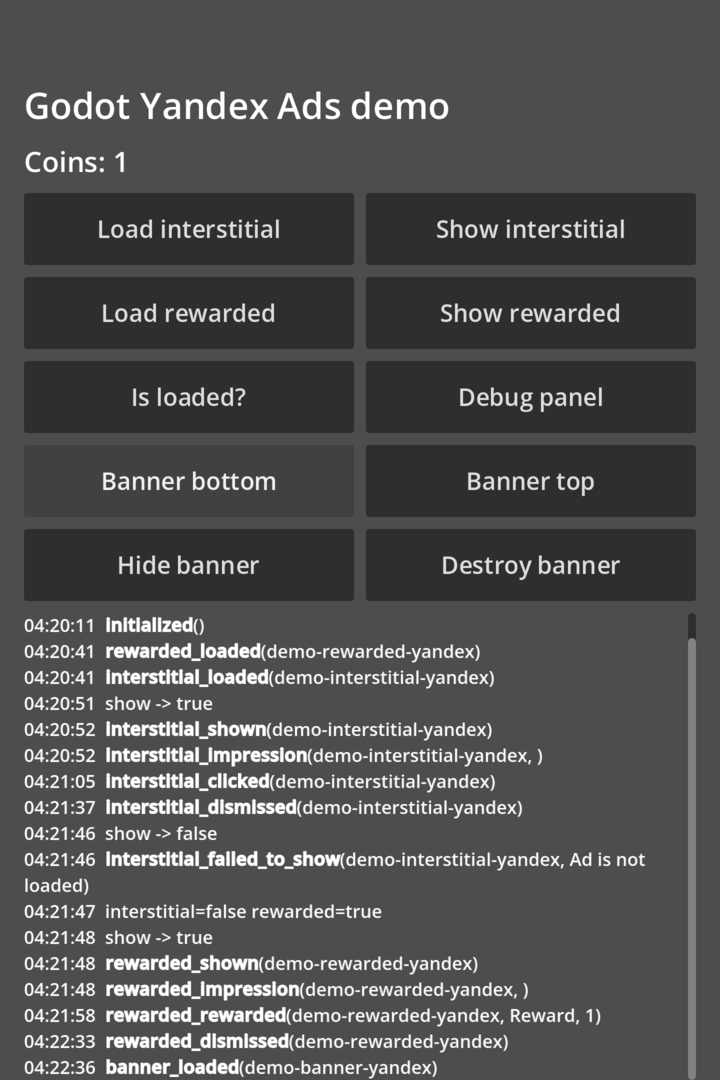
Android plugin for Yandex Mobile Ads SDK 8.6.0 (Godot 4.6+, v2 Android plugin, Kotlin). Features: - Interstitial, rewarded and banner ads. - Every SDK event is a signal: loaded, failed_to_load(code, message), shown, failed_to_show(message), impression(json), clicked, dismissed, rewarded(type, amount), banner_loaded / banner_clicked. - Every signal carries the ad unit id, so several ad units of one format can be used at once. - Banners are placed at the top or bottom inside the safe area (status bar, navigation bar and camera cutout are respected). - YandexAds autoload with a safe fallback in the editor and on desktop: loads fail with code -1, so your game takes the same path as with no fill. - The SDK is pulled by Gradle at export time, it is not bundled into the plugin. Setup: enable the plugin (it adds the YandexAds autoload), install the Android build template and enable "Use Gradle Build" in the Android export preset. Quick start: YandexAds.load_interstitial("demo-interstitial-yandex") YandexAds.interstitial_loaded.connect(func(id): YandexAds.show_interstitial(id)) Includes migration notes from noctisalamandra/godot-yandex-ads-android. Documentation in English and Russian in the repository README. Android only. Tested with Godot 4.6.3 on Android 17. |
Android plugin for Yandex Mobile Ads SDK 8.6.0 (Godot 4.6+, v2 Android plugin, Kotlin). Features: - Interstitial, rewarded and banner ads. - Every SDK event is a signal: loaded, failed_to_load(code, message), shown, failed_to_show(message), impression(json), clicked, dismissed, rewarded(type, amount), banner_loaded / banner_clicked. - Every signal carries the ad unit id, so several ad units of one format can be used at once. - Banners are placed at the top or bottom inside the safe area (status bar, navigation bar and camera cutout are respected). - YandexAds autoload with a safe fallback in the editor and on desktop: loads fail with code -1, so your game takes the same path as with no fill. - The SDK is pulled by Gradle at export time, it is not bundled into the plugin. Setup: enable the plugin (it adds the YandexAds autoload), install the Android build template and enable "Use Gradle Build" in the Android export preset. Quick start: YandexAds.load_interstitial("demo-interstitial-yandex") YandexAds.interstitial_loaded.connect(func(id): YandexAds.show_interstitial(id)) Includes migration notes from noctisalamandra/godot-yandex-ads-android. Documentation in English and Russian in the repository README. Android only. Tested with Godot 4.6.3 on Android 17. |
| Category | Tools | Tools |
| License | MIT | MIT |
| Repository Provider | Custom | Custom |
| Repository Url | https://github.com/BlackRaincoat/godot-yandex-ads | https://github.com/BlackRaincoat/godot-yandex-ads |
| Issues Url | https://github.com/BlackRaincoat/godot-yandex-ads/issues | https://github.com/BlackRaincoat/godot-yandex-ads/issues |
| Godot version | Godot 4.6 | Godot 4.6 |
| Version String | 1.0.0 | 1.0.0 |
| Download Commit | https://github.com/BlackRaincoat/godot-yandex-ads/releases/download/v1.0.0/GodotYandexAds-1.0.0.zip | https://github.com/BlackRaincoat/godot-yandex-ads/releases/download/v1.0.0/GodotYandexAds-1.0.0.zip |
| Download Url (Computed) | https://github.com/BlackRaincoat/godot-yandex-ads/releases/download/v1.0.0/GodotYandexAds-1.0.0.zip | https://github.com/BlackRaincoat/godot-yandex-ads/releases/download/v1.0.0/GodotYandexAds-1.0.0.zip |
| Icon Url |
https://raw.githubusercontent.com/BlackRaincoat/godot-yandex-ads/main/.assetlib/icon.png

|
https://raw.githubusercontent.com/BlackRaincoat/godot-yandex-ads/main/.assetlib/icon.png
|
| Preview Insert | ||
|---|---|---|
| Type | image | |
| Image/Video URL |
https://raw.githubusercontent.com/BlackRaincoat/godot-yandex-ads/main/.assetlib/screenshot-demo.png
|
|
| Thumbnail |
https://raw.githubusercontent.com/BlackRaincoat/godot-yandex-ads/main/.assetlib/screenshot-demo.png
|
|