
In Godot 4.6, IK is back in 3D!
Of course, “IK” means inverse kinematics.
If you have experience with Godot 3.x, you might remember that IK was removed during the upgrade to 4.0. I explained in a previous blog post that it was removed because the old skeleton API design had issues and needed reworking.
Then, you might wonder if it was theoretically possible to implement IK alongside the SkeletonModifier3D implementation in 4.4. However, we had to avoid adding immature features and then hastily removing it again. To implement IK, we staged the elements for the entire IK across three versions.
This blog post will explain that journey.
Godot 4.4
In Godot 4.4, I implemented the base class for SkeletonModifier3D, along with two new modifiers, LookAtModifier3D and RetargetModifier3D.
SkeletonModifier3D / LookAtModifier3D
LookAtModifier3D was the minimal implementation to verify that the SkeletonModifier3D design was correct. LookAtModifier3D could be considered equivalent to one-bone IK, so it was suitable as a test case.
RetargetModifier3D
However, when implementing LookAtModifier3D, I confirmed that users must specify the bone axis based on the bone rest. It was my initial concern that the retarget feature implemented in 4.0 discarded the bone rests of the imported skeleton.
As this concern became a certainty, I attempted to preserve bone rests by implementing RetargetModifier3D.
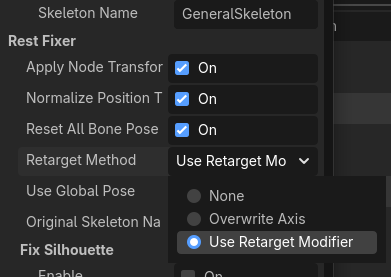
It was fortunate for me that the processing order design of SkeletonModifier3D matched the requirements for implementing RetargetModifier3D.
Godot 4.5
In Godot 4.5, I implemented SpringBoneSimulator3D and BoneConstraint3D (and its three child classes AimModifier3D, ConvertTransformModifier3D and CopyTransformModifier3D).
By the way, I’m involved in a project that utilizes a 3D character model format known as VRM. VRM has implementations of SpringBone and Constraint as model-specific configurations that can be ported to cross-platform environments, so ensuring compatibility with these was one of the purposes.
SpringBoneSimulator3D
One challenging part of implementing SpringBoneSimulator3D was creating the bone chain internally. Specifically, by setting the root bone as the ancestor and the end bone as the descendant, we could retrieve the bones between them and automatically construct the joint array.
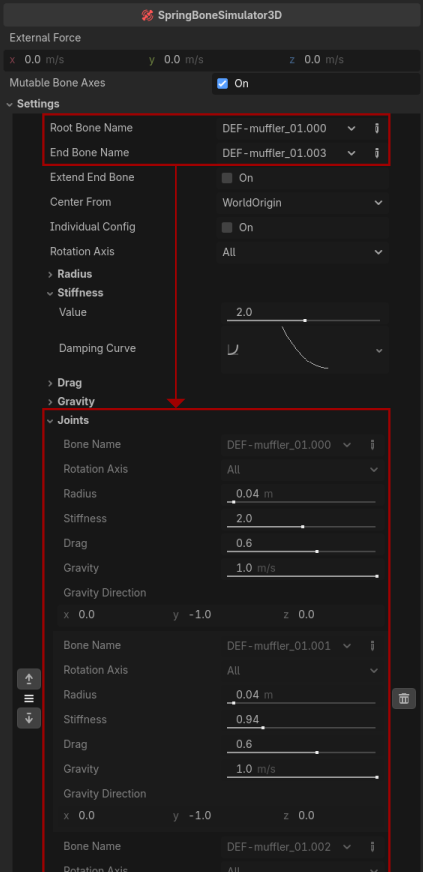
Compared to users manually creating these arrays, this approach reduced user operations and validation on the core side, making it beneficial for both ends.
BoneConstraint3D (and 3 child classes)
BoneConstraint3D is a feature that allows bones to interact with other bones. The actual behavior and calculations it provides are simple.
What was challenging here was the design for a base class containing a virtual struct array as a member and extending that struct in a child class. This topic is a bit more advanced for beginner coders, but when using struct arrays as properties in Godot, you need to implement a slightly tricky approach.
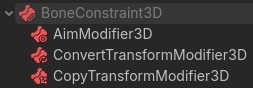
I already had the design idea that IK would have a base class similar to BoneConstraint3D, with child classes extending the structure to implement the actual solver. So, I was confident that merging and establishing that method at this point would be beneficial for IK.
Godot 4.6
Finally, I began implementing IK in Godot 4.6.
IKModifier3D (and 7 child classes)
As a first step, I defined IKModifier3D and ChainIK3D by reusing BoneConstraint3D and SpringBoneSimulator3D. After that, I implemented the process for moving joints called the IK solver.
Therefore, IKModifier3D has the following child classes:
- IKModifier3D
- TwoBoneIK3D
- ChainIK3D
- SplineIK3D
- IterateIK3D
- FABRIK3D
- CCDIK3D
- JacobianIK3D
When implementing those IKs, I made sure to keep them to the minimum functions.
Some IK systems outside of Godot might have additional “processing to make the IK results look better”, separate from the core calculation algorithm that rotates the bones. In the rich IK system, the IK class may include them and can enable their processing by their bool property.
Then, I believed separating them would help maintain maintainability and extendability. In other words, if only the “processing to make the IK results look better” can be reused, when users want to implement custom IK, they only need to implement a minimal IK solver.
The following are the improvements and additions made in Godot 4.6 to make the IK results look better.
Tweak BoneConstraint3D
For example, there are cases where Twist is applied before IK calculation, or where the end bone is directed toward the IK target after IK calculation.
In Godot 4.5, the BoneConstraint3D could only assign bones as reference objects, but in 4.6, it can now assign Node3D objects.
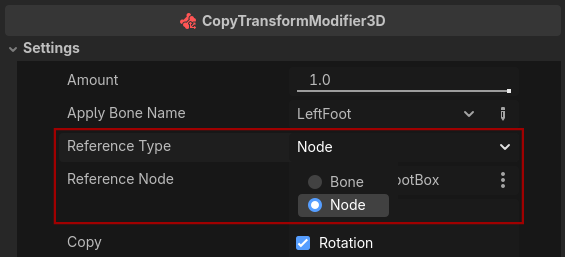
This tweaking allows BoneConstraint3D to be used to perform these additional rotations.
BoneTwistDisperser3D
In theory, using ConvertTransformModifier3D allows you to apply the rotation of descendant bones to their ancestors. However, the process for setting this up properly was somewhat complex and could only be handled by advanced users.
BoneTwistDisperser3D provides a simple way to achieve that process.
LimitAngularVelocityModifier3D
LimitAngularVelocityModifier3D is a modifier that limits angular velocity. The behavior is quite simple, so it doesn’t need much explanation.
However, it’s worth learning that there are two types of IK.
Deterministic IK
In computer science, “deterministic” means that the result is always the same for a given input. In particular, for game applications like Godot, the term means that the result does not depend on the state of the previous frame. Incidentally, since AnimationMixer already has a deterministic option, that immediately made me decide to adopt this term.
TwoBoneIK3D and SplineIK3D are always deterministic. However, in IterateIK3D, whether it is deterministic depends on the options.
IterateIK3D repeats the routine provided by the solver to approach the end bone toward its goal. At this point, the number of repetitions per frame depends on the option.
When the deterministic option is disabled, it means that the iteration is performed by carrying over the state from the previous frame. In this case, even with a small number of iterations per frame, the end bone can reach the goal eventually as frames progress.
In contrast, when the deterministic option is enabled, the previous frame’s state is not carried over. Therefore, if the number of iterations per frame is small, the end bone may never reach its goal.
However, if you want to ensure consistent results depending on the relative position between the IK target and the skeleton, the deterministic option is useful. For example, it is ideal for online applications where only the coordinates of the IK target are shared to synchronize the model’s pose.
As a point to note, deterministic IK cannot avoid causing rotation with large angular velocities by its design. It goes without saying that LimitAngularVelocityModifier3D is useful for smoothing this out.
Looking back on the journey
Between versions 4.4 and 4.6, excluding migrations, including base classes, 19 new SkeletonModifiers have been implemented!
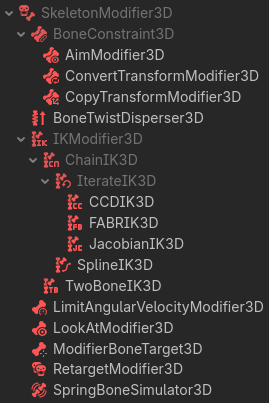
There are many possibilities depending on how you combine them. So we have a plan to add detailed explanations and tutorials to the documentation in the future, but since that is expected to be quite large, we will need more time…
For now, I’ll show you just one example in advance. This setup emulates the old SkeletonIK3D’s magnet option.
As you can see from that example, it was just a 2-pass deterministic FABRIK. As explained above, it was also “processing to make the IK results look better”, and I think you can understand that the process could be separated.
At last, I wish you all the best in creating fun games using SkeletonModifier3Ds.
Support
Godot is a non-profit, open-source game engine developed by hundreds of contributors in their free time, as well as a handful of part or full-time developers hired thanks to generous donations from the Godot community. A big thank you to everyone who has contributed their time or their financial support to the project!
If you’d like to support the project financially and help us secure our future hires, you can do so using the Godot Development Fund platform managed by Godot Foundation. There are also several alternative ways to donate which you may find more suitable.