

Godot OpenXR Vendors plugin v5.1
The OpenXR Vendors plugin is an official GDExtension that builds on top of the OpenXR support in Godot, and provides support for additional functionality, primarily vendor-specific OpenXR extensions.
Today we are releasing version 5.1, which can be downloaded from the Asset Store, Asset Library, or GitHub release page.
The previous major version (v4) promised support for Godot 4.4 and newer, which meant that we couldn’t take advantage of features only available in Godot 4.5 or 4.6.
So, an important part of the v5 upgrade was increasing the minimum supported version to Godot 4.6, which unlocked our ability to implement some things we weren’t able to before.
Breaking changes
The major version upgrade introduces the following compatibility breakages:
- Renamed some very long class names (like
OpenXRAndroidEnvironmentDepthExtensionWrapper) to a somewhat more manageable length by dropping the superfluous*Wrappersuffix (to becomeOpenXRAndroidEnvironmentDepthExtension, for example). - Godot 4.6 now bundles the Khronos OpenXR loader for Android so it was removed from this plugin.
- Rec709 is now the default color space when using Meta’s color space extension. This is an improvement we’ve wanted to do for a long time, but waited for a major version update so it would be less disruptive for users.
Android XR
Quite a few of the recent improvements to the plugin (not only for v5, but also v4.2 and v4.3) have been to support vendor-specific features of Android XR.
This is due in large part to the collaboration between Google, the Godot Foundation, and W4 Games which was announced in November 2025.
This upgrade includes the following new features:
- Trackables: Provides information about the physical space the user is in. Android XR also supports OpenXR spatial entities, which provides similar functionality, but at the moment there’s still features in the Android XR-specific trackables that aren’t supported yet in the multi-vendor spatial entities.
- Dynamic Resolution: Will dynamically scale down the render resolution in response to system load, which can help maintain a consistent frame rate. We implemented a similar feature for Meta headsets back in v4.
- Unbounded Reference Space: Enables the user to move freely through a complex environment, even many meters from where they started.
- Automatically launching the streaming client: Using Android XR’s Direct Preview functionality, you can run XR applications on your desktop which are streamed to the headset, which can allow for faster iteration time. Now, the plugin can make this easier by automatically launching the streaming client on your headset.
- Mouse interaction: Allows accessing mouse input in a similar way to traditional XR controllers.
To top up these new features, we have collaborated with Google on documentation, guidance, and samples for developing on Android XR with Godot.
OpenXR validation layers for Android
The Khronos Group provides validation layers for OpenXR that can perform extra validation to ensure that Godot is using OpenXR correctly. Enabling these on desktop is very easy, and Khronos even provides pre-built binaries for Windows and macOS.
However, enabling them on standalone Android-based headsets is much trickier. You’d need to build the layers yourself, and manually add them to your Godot project at a specific location, along with a special JSON file.
Version 5 of the Godot OpenXR Vendors plugin simplifies this process by building the Android binaries for the OpenXR validation layers, and wrapping them into an Android library binary (AAR). For added convenience, the generated Android library binary (AAR) is uploaded to MavenCentral alongside each release of the Godot OpenXR Vendors plugin. This enables OpenXR Android projects to easily integrate the validation layers by adding a dependency to the OpenXR validation layers Android library.
For Godot projects built with the Godot OpenXR Vendors plugin v5, all you need to do is click a checkbox in your export settings!
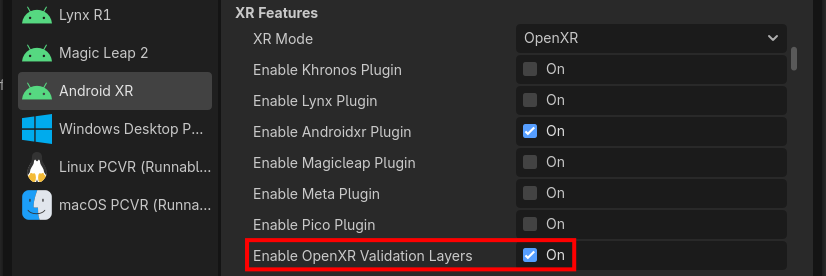
While this isn’t a feature that will be used by most XR developers, it is a tool that will allow us to develop Godot and the plugin to be more compliant with the OpenXR spec.
Using Composition Layer extensions on the main Projection Layer
The plugin allows using several OpenXR extensions to add features to the OpenXRCompositionLayer node (and its children), which is most frequently used for rendering UI panels or media.
The main 3D content that’s rendered by Godot is also associated with a composition layer, the main projection layer. However, up until now, it wasn’t possible to configure any of these extensions on that layer. That’s changed in v5.1!
Now you can set any of the same extra configuration that was available via OpenXRCompositionLayer nodes on the main projection layer too, either through code or Project Settings.
On some headsets (namely, Meta’s), this can allow using the XR_FB_composition_layer_depth_test extension to allow content rendered by Godot to correctly appear in front of or behind other composition layers, without having to use hole punching (which can’t be used with transparent layers). This is a feature that has been requested by the community for a long time.
Hybrid App testing on desktop
In v4, we added support for Hybrid Apps on Android, which can dynamically switch between fully immersive and floating 2D panels.
However, developers couldn’t test them on desktop, only when deploying to the headset.
In v5, we’ve added the ability to simulate Hybrid App switching on desktop, which can help to accelerate iteration speed.
The illustration picture for this article comes from Expedition to Blobotopia which was created entirely in VR and available for Meta and Android XR headsets.