
Godot XR Game Jam V
We’re having another XR-focused game jam starting March 15/16th (depending on your timezone). The jam runs for a full week, after which voting will remain open for the week after.
This is always a good chance to get introduced to using XR in Godot, whether you are new to Godot or new to XR.
We’ll primarily be helping people along on our XR channel on the official Godot Discord.
Check out the details on the jam’s itch.io page.
OpenXR 1.1. support
The OpenXR 1.1 specification was released some time ago and adoption of this is now such that most headsets support it.
OpenXR is the industry standard interface making it possible for Godot to interact with many of the leading XR devices.
OpenXR 1.1 has promoted various extensions to core such as:
- Palm pose is now Grip surface pose and guaranteed to be supported.
- Local floor reference space is guaranteed to be supported.
- Various controller interaction profiles are now part of the core.
- New Meta interaction profiles identifying specific controllers.
Godot now has logic to initialise OpenXR 1.1 when supported by the headset and fall back to OpenXR 1.0 if not.
Some of these promotions have resulted in renames of various entries in the action map. For developers, we’ve made this as transparent as possible: you set up your action map for OpenXR 1.1 and Godot will translate it to an OpenXR 1.0 action map.
Note that this will result in your existing action map being upgraded to OpenXR 1.1 standards, and thus will be incompatible with earlier versions of Godot.
This work was made possible thanks to funding through the Khronos Godot Integration Project.
Vulkan multithreading
Godot has the ability to run rendering in a separate thread allowing for parallel processing of the next frame while the current frame is being produced.
While we did an initial pass for thread safety in the core logic around OpenXR, the vendor plugin has now undergone the same treatment, as well as improving threading support for a number of new features in the core.
This potentially provides a decent performance upgrade when running your game on standalone VR hardware.
This work was made possible thanks to contributions by W4Games.
Setup wizard
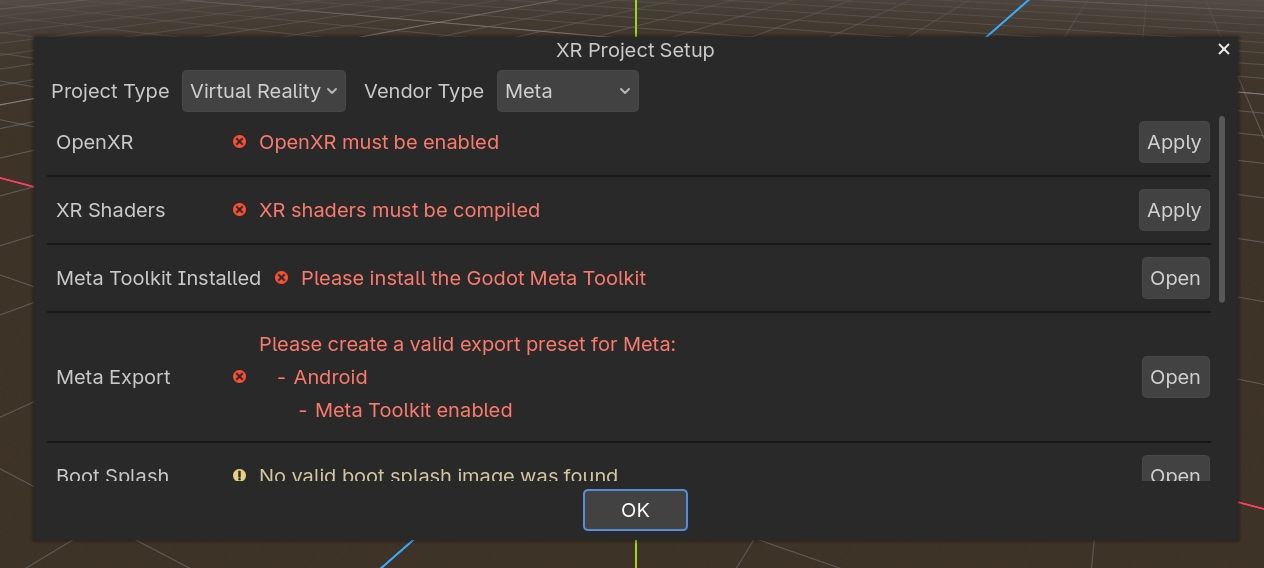
The Godot OpenXR vendor plugin now includes a Project Setup Wizard! This tool is meant to guide users through the configuration of new XR projects, getting them export-ready for standalone headsets faster than ever. With the vendor plugin installed, you can find the XR Project Setup Wizard under the tools section of the project menu. Simply select your target headset vendor and project type, and the wizard will present you with a list of required and recommended settings tailored to your choices, most of which can be applied instantly with the click of a button.
Without a main scene set for your project, the wizard also provides access to template XR scenes and scripts that handle all the needed logic for starting XR. Be sure to give this tool a try on your next Godot XR project!
Khronos loader
In Godot 4.6, Godot now embeds the Khronos OpenXR loader into any Android OpenXR game. Godot already did this for other platforms but previously relied on the vendor plugin to embed the loader.
This change in theory allows you to create a single Android OpenXR APK and deploy it to multiple headsets. This is great news for people participating in game jams or wanting to distribute through stores like itch.io.
This works for many of the mainstream headsets. However, a number of runtimes do require additional manifest entries to unlock functionality. Or they can require various vendor extensions for features to be unlocked. We do recommend users keep using the vendor plugin to have access to these things.
DirectX default on Windows
Godot recently made DirectX the default back-end on Windows for new projects. It is important to note here that for XR developers, there are things to consider.
Godot fully supports DirectX as a backend for OpenXR. However, as all of the standalone headsets only support OpenGL and Vulkan, there are potential differences between using DirectX and the other backends. We are also further along with certain optimizations on the other backends.
Nothing much changes for developers who are using the Compatibility renderer. If you’re using the Mobile or Forward+ renderers for your XR projects, we recommend using Vulkan also on Windows for the foreseeable future.
New platforms
Godot 4.6 welcomed two new XR platforms into the mix.
Godot now has official support for AndroidXR. The necessary changes were added to both Godot and the vendor plugin late last year. Together with W4Games, we are hard at work bringing additional AndroidXR functionality to Godot. As part of this work, we’re also contributing to a few open-source Godot game projects and bringing them to the AndroidXR platform.
We are also proud to report that Godot runs on the Steam Frame. We have tested all three deployment modes: PCVR over Steam Link, running natively as an Android APK, and running a native Linux ARM64 version. With thanks to GP Garcia, we can also confirm that the popular GodotSteam library is working as expected on the platform including a native Linux ARM64 build that is now available.
The illustration picture for this article comes from Augmental Puzzles, an XR game by Flammable Penguins Games, a puzzle game currently focussing on Sudoku with daily challenges. Other puzzle types are in the pipeline. It’s currently available on the Meta Store and Steam.