
Following hot on the heels of the last snapshot, the third development snapshot for what will become Godot 4.7 is now out! This snapshot comes packed with some long-awaited features, some of which may transform the way you design GUIs in Godot. As always, we need as much testing as possible to ensure everything can be stabilized.
Please consider supporting the project financially, if you are able. Godot is maintained by the efforts of volunteers and a small team of paid contributors. Your donations go towards sponsoring their work and ensuring they can dedicate their undivided attention to the needs of the project.
Jump to the Downloads section, and give it a spin right now, or continue reading to learn more about improvements in this release. You can also try the Web editor, the XR editor, or the Android editor for this release. If you are interested in the latter, please request to join our testing group to get access to pre-release builds.
The cover illustration is from Lucid Blocks, a game where you explore, build, and survive in a cryptic expanse oozing with dreamlike oddities and esoteric critters. You can buy the game on Steam, and follow the developers on Bluesky, YouTube, or Discord.
Highlights
GUI: Add transform offset to Control nodes
One of the most long-awaited features in Godot’s GUI system is to be able to translate, rotate, or scale a Control node without it affecting the rest of the container. This is most notably used for animation purposes, so that buttons can smoothly slide in view or fade away with a scale change.
However, Godot’s various Container nodes apply the position, rotation, and scale to their children, which means any changes made to the children’s transform is lost when the container is sorted again (which occurs when children are added, removed, or moved in the scene tree). The new transform offset properties implemented by Timo Schwarzer in GH-87081 aim to address this limitation in a self-contained manner, similar to the transform property in CSS.
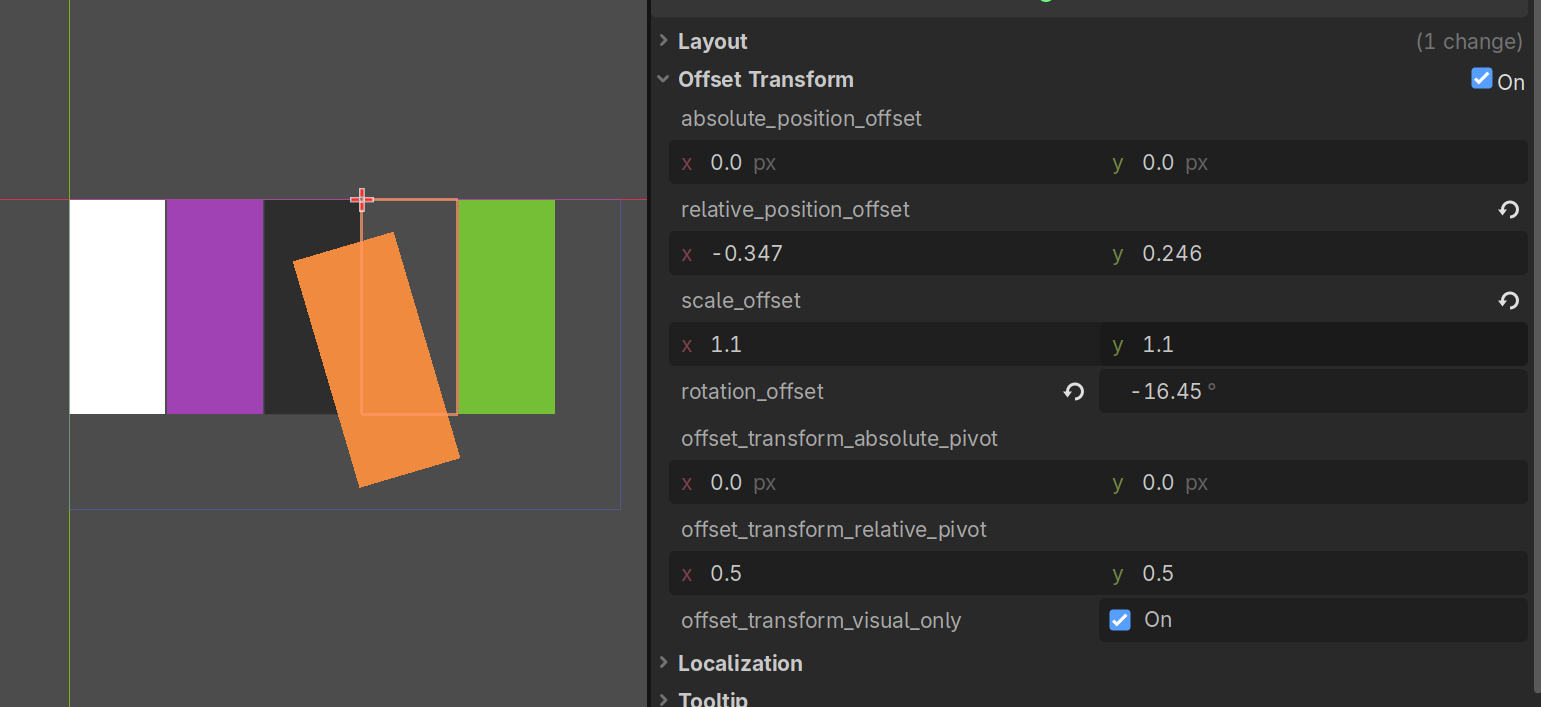
You can choose whether the transform offset affects mouse input. By default, transform offset is purely visual, which means there is no risk of buttons losing their hover status after being transformed. Controls with a transform offset applied show their original bounding box with a gray dotted rectangle:
GUI: Implement search bar for PopupMenu
As a tool that can be used to create complex projects, Godot is no stranger to popups with dozens of options to choose from (if not more). While incremental search can be used to focus the first item that starts with a given letter (by pressing the letter in question), this can be difficult to use as incremental search lacks visible feedback once you perform it.
To resolve this longstanding usability quirk, Alexander Streng added search bars to PopupMenu in GH-114236. This is particularly useful for long lists such as animations, skeleton bones, inspector dropdowns for Resource properties, and more. A visible search bar also makes searching more discoverable, which is a win for usability.
This feature is available in any PopupMenu node, which means it can also be used in projects such as non-game applications.
Editor: Add vertex snapping to the 3D editor
One of the most keenly awaited features to improve 3D editor usability is finally here! Robert Yevdokimov implemented vertex snapping in the 3D editor in GH-117235. This allows you to snap the selection to nearby nodes’ vertices, which is useful for level design and ensuring everything is visually connected to neighboring nodes.
To use vertex snapping, hold B and move the mouse near the selection’s vertices. Once you see a yellow circle, hold the mouse button and move the mouse to the desired location (you can release B at this point). The circle becomes green once a vertex to snap to is detected near the mouse cursor. For better depth perception, the yellow/green circle appears with reduced opacity if it’s occluded by another surface.
Vertex snapping works differently depending on whether the selected node has a mesh-based representation or not. For example, MeshInstance3D and CSG nodes have a mesh-based representation, while other nodes such as Label3D and Marker3D do not. Nodes without a mesh-based representation will teleport to the highlighted vertex when holding B and clicking on another node’s vertex. Thanks to the follow-up contribution GH-117380, you can opt into this behavior for nodes that have a mesh-based representation too.
Editor: Use class name instead of Object ID in remote scene view
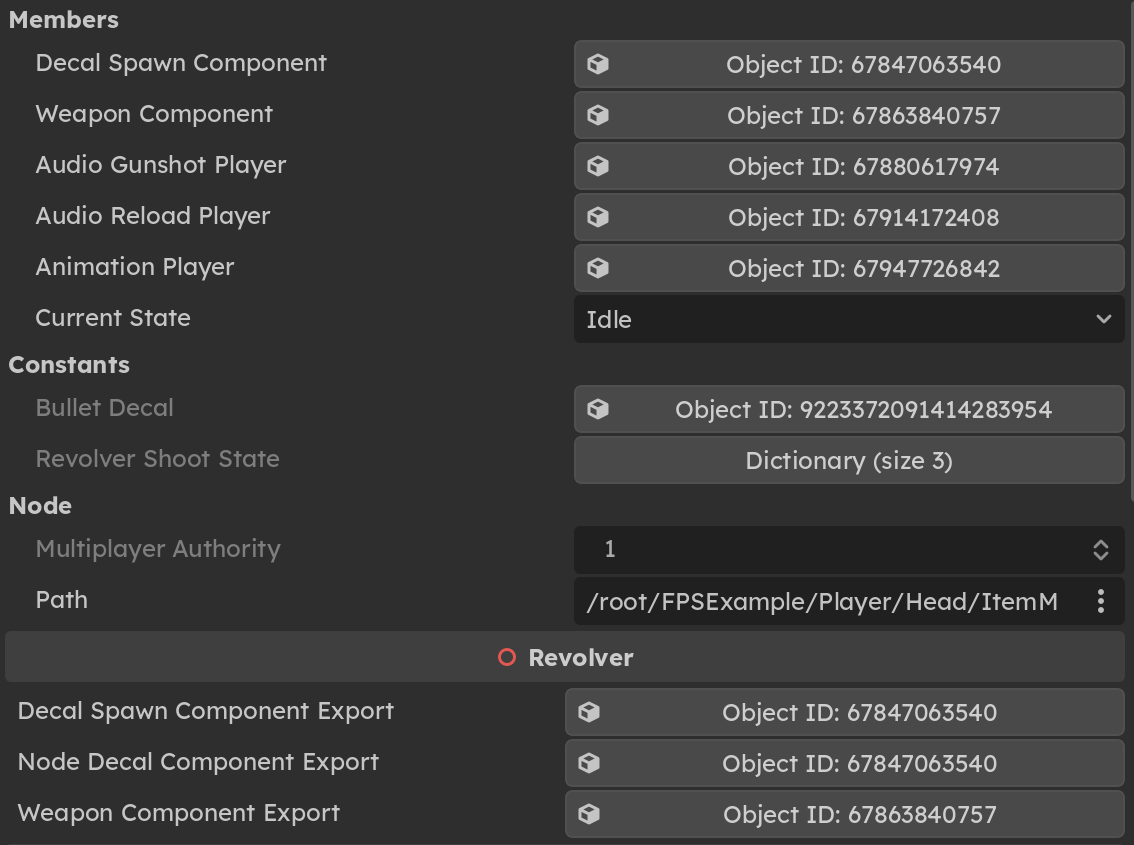
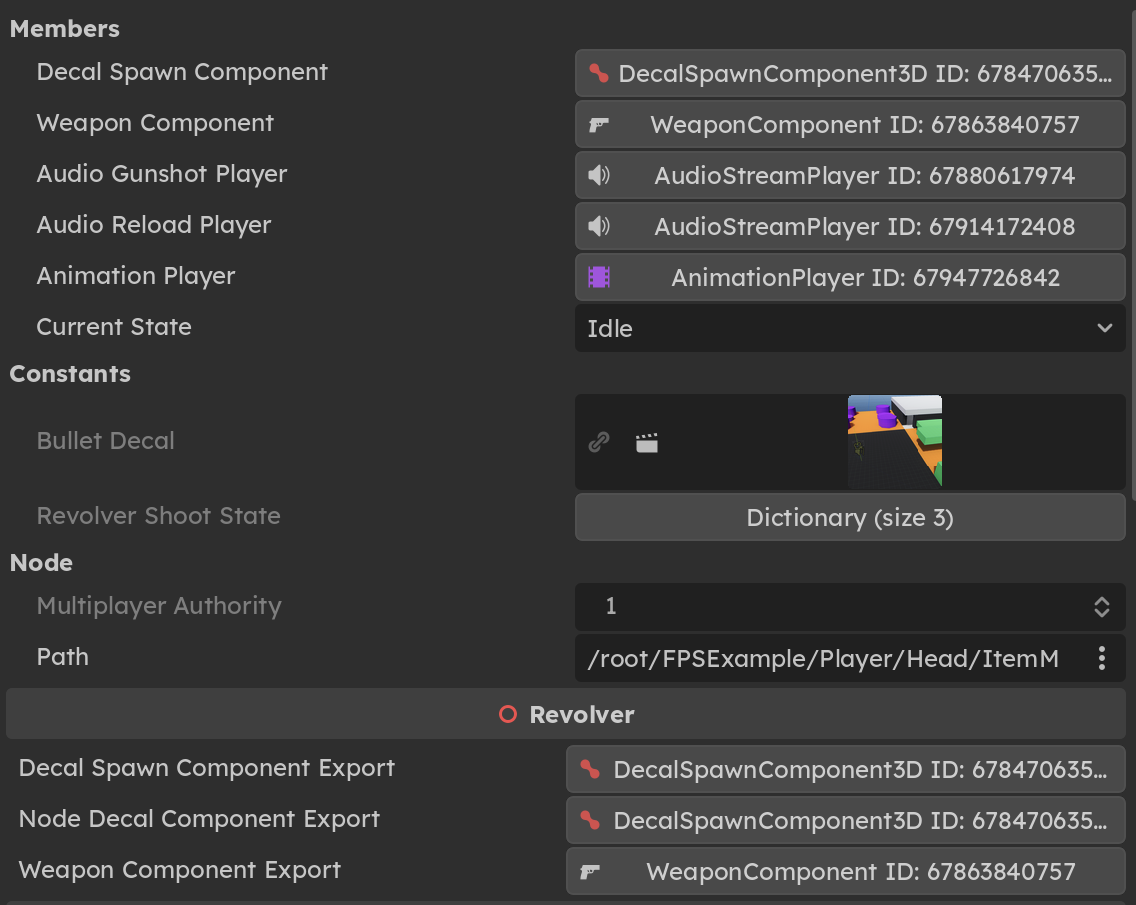
The remote scene tree is very useful to diagnose what’s going on in a running project. However, until now, everything was shown as a bunch of anonymous-looking Object IDs. Jayden Sipe has improved this view by adding class names in GH-115738, making this tool significantly more useful.
Before
After
Editor: Create a proper editor for MeshLibrary
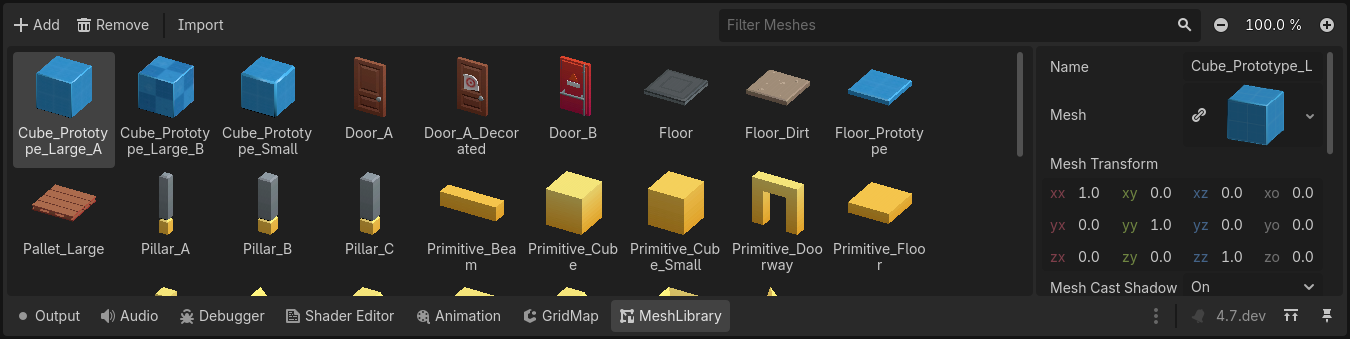
GridMap users rejoice! The MeshLibrary resource (which stores tiles that can be used in a GridMap node) can now be edited much more easily, thanks to the work of Michael Alexsander in GH-117376.
This new bottom editor comes with the following features:
- Presentation of items in a grid, with search and zooming.
- Editing of individual items in a separate inspector.
- Full undo/redo for all actions.
- Fallback preview to an item’s mesh in case none was specifically set.
Here’s an example of what it looks like:
Android: Add support for picture-in-picture
Thanks to the work of Fredia Huya-Kouadio in GH-114505, Godot now has the ability to run a project and move it to a small window pinned to one of the screen corners. This relies on Android’s native support for picture-in-picture (PiP) display. For example, YouTube on Android uses this functionality to show the currently played video in a corner of the screen.
Note that picture-in-picture does not permit interacting with the application while it is in this mode, so this feature is most useful for applications and games that have sections that don’t require real-time input (idle games, autobattlers, etc.).
Picture-in-picture functionality can be enabled in two ways:
- Explicitly by calling
DisplayServer.pip_mode_enter(). - Configured to happen automatically by calling
DisplayServer.pip_mode_set_auto_enter_on_background(). In this case, the app will automatically go into picture-in-picture mode when the user presses the home button or uses the home gesture on their device.
As an example, since this ability can be toggled at runtime, you can allow picture-in-picture mode to engage when a cutscene starts and disable it when returning to interactive contents.
Here’s an example of it in action on the game Rift Riff, where PiP mode is only enabled during one of the game’s waves:
Android: Enable orientation change in Script Editor
The improvements for Android don’t stop there. Thanks to the work of Anish Kumar in GH-117109, you can now switch to portrait mode while in the script editor on Android devices. This makes it easier to view code while you’re typing on a virtual keyboard. Note that distraction-free mode must be enabled for this to be possible (it can be toggled). This restriction has to be in place, since the side docks take a lot of horizontal space and the script editor in portrait mode wouldn’t be practical with the side docks visible.
Linux/*BSD: Support HDR output
Continuing from the previous development snapshots which added support for HDR output on Windows and Apple platforms, we have added support for HDR output on Linux when using the Wayland display server (GH-102987). Kudos to ArchercatNEO for their dedication to developing and maintaining the Wayland support alongside the Windows and Apple PRs for more than a year!
Also of note is that documentation on HDR output is now available. Check it out! A demo project for testing HDR output will follow soon.
And more!
There are too many exciting changes to list them all here, but here’s a curated selection:
- 3D: Add automatic smoothing for CSG nodes (GH-116749).
- Animation: Optimize Animation Resource, Library, Mixer, and Player (GH-116394).
- Animation: Optimize AnimationTree, Improve internals & Editor &
Node::process_thread_groupsafety (GH-117277). - Core: Improve thread-safety of
Objectsignals (GH-117511). - Core: Use
TRACY_ON_DEMANDby default for Tracy integration (GH-1117583). - Editor: Add
View3DControllerfor editor 3D view manipulation (GH-115957). - Editor: Add 3D vertex snap base setting (Vertex/Origin) (GH-117380).
- Editor: Depict version discrepancies in Project Manager (GH-111528).
- Editor: Generate and display documentation for the properties generated by
PropertyListHelper(GH-115253). - Editor: Reorganize Output dock (GH-112690).
- Editor: Revamp autoload creation (GH-91124).
- Editor: Stop autocomplete from eating words by default (GH-117464).
- Editor: Support folding, groups, and subgroups in remote scene inspector (GH-117357).
- GUI: Add triple-click paragraph selection to RichTextLabel (GH-116868).
- Input: Add project setting to ignore joypad events if the app is unfocused (GH-115119).
- Platforms: Add haptic feedback on long-press right-click in the editor (GH-117198).
- Platforms: Enable wake for events if Magnet is running (GH-116524).
- Rendering: Add fast path to Polygon2D (GH-117334).
- Rendering: Add scale 3D and rotation 3D in particle process (GH-1112447).
Changelog
113 contributors submitted 297 fixes for this release. See our interactive changelog for the complete list of changes since 4.7-dev2. You can also review all changes included in 4.7 compared to the previous 4.6 feature release.
This release is built from commit 778cf54da.
Downloads
 Linux
Linux macOS
macOS Windows
Standard build includes support for GDScript and GDExtension.
.NET build (marked as mono) includes support for C#, as well as GDScript and GDExtension.
While engine maintainers try their best to ensure that each preview snapshot and release candidate is stable, this is by definition a pre-release piece of software. Be sure to make frequent backups, or use a version control system such as Git, to preserve your projects in case of corruption or data loss.
Known issues
With every release we accept that there are going to be various issues, which have already been reported but haven’t been fixed yet. See the GitHub issue tracker for a complete list of known bugs.
There are currently no known issues introduced by this release.
Bug reports
As a tester, we encourage you to open bug reports if you experience issues with this release. Please check the existing issues on GitHub first, using the search function with relevant keywords, to ensure that the bug you experience is not already known.
In particular, any change that would cause a regression in your projects is very important to report (e.g. if something that worked fine in previous 4.x releases, but no longer works in this snapshot).
Support
Godot is a non-profit, open source game engine developed by hundreds of contributors on their free time, as well as a handful of part and full-time developers hired thanks to generous donations from the Godot community. A big thank you to everyone who has contributed their time or their financial support to the project!
If you’d like to support the project financially and help us secure our future hires, you can do so using the Godot Development Fund platform managed by Godot Foundation. There are also several alternative ways to donate which you may find more suitable.